


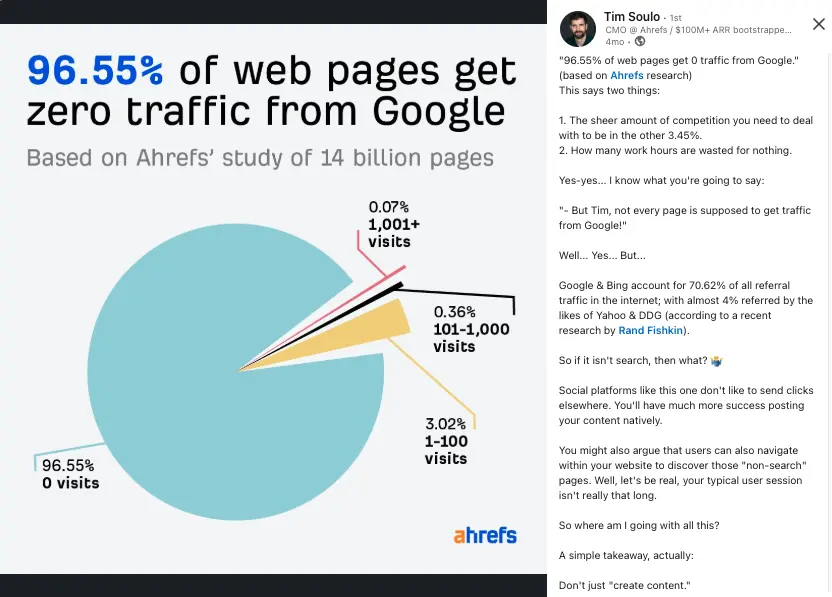
Did you know that 96.55% of web pages get zero traffic from Google?
According to Ahrefs, the vast majority of websites never see a single visitor from search results.
What does that tell us?
- Most website owners don’t really know how to do SEO properly—especially when starting from scratch.
- A small percentage of creators dominate Google’s search results, while a vast amount of content is never seen.
That’s exactly what Tim Soulo, CMO at Ahrefs, pointed out in his LinkedIn post.
And if you’ve ever spent time and effort creating content only to get zero traffic, you know how frustrating that feels.
Your boss (or you) wants results.
Mistakes are costly.
I get it.
I’ve been in the SEO game for years. First, helping B2B and SaaS companies grow their organic traffic, and now, as a solopreneur building my own online business.
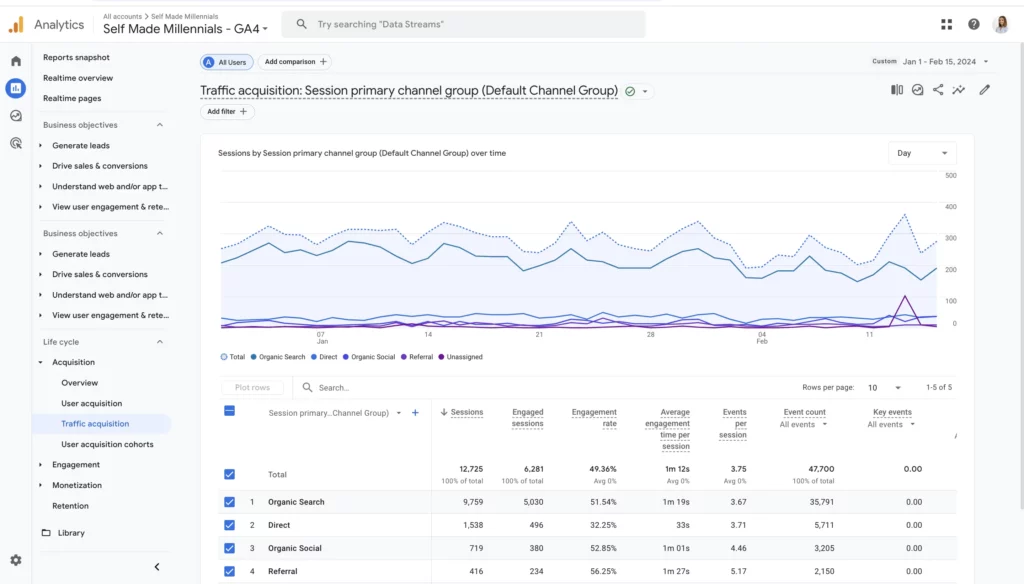
I grew my website to 10,000+ monthly visits with just roughly 90 pages, all while treating it as a side project.
In this article, I’ll explain how to do SEO for a new website with actual steps and strategies.
I’ll also show you exactly what worked for me and what I focus on now to keep growing.
If you’re launching a new website or just want to finally understand SEO, this guide is for you.
Let’s get straight into it with this SEO checklist for new websites:
- Pick a domain name
- Pick a hosting provider
- Choose a content management platform (like WordPress)
- Install SEO plugins
- Plan a website structure
- Set up Google Analytics and Google Search Console
- Know your competitors and what they do
- Conduct keyword research to find suitable keywords
- Create a content writing plan
- Establish credibility
- Publish optimized content
- Track the indexability of your website pages
- Collect and fix issues, if any
- Start tracking your overall website performance
- Continue creating and publishing optimized content
This is exactly the process I followed to grow my website. In fact, I’m still doing step 15, consistently publishing and updating content, and it’s paying off.
Despite multiple Google algorithm updates, my site keeps growing. Because I started with a solid SEO foundation from day one and have been sticking with it ever since.
Now, I know you might be wondering: “How do I actually implement all these SEO strategies for my new website?”
I’ll walk you through the most important ones in detail. And if you still have questions, feel free to ask in the comments.
Let’s get started.
Pick a hosting provider
Every website needs a place to “live” online. That’s where web hosting comes in.
However, not all hosting providers are created equal. Google has made it clear that site speed affects rankings. So, a slow website can hurt your chances of showing up in search results.
There are tons of hosting companies out there.
Take Bluehost, for example, they claim to offer top-tier WordPress hosting. But in my experience, their slow server response times made my site painfully sluggish.
After digging into the issue, I realized switching to a faster hosting provider could make a big difference.
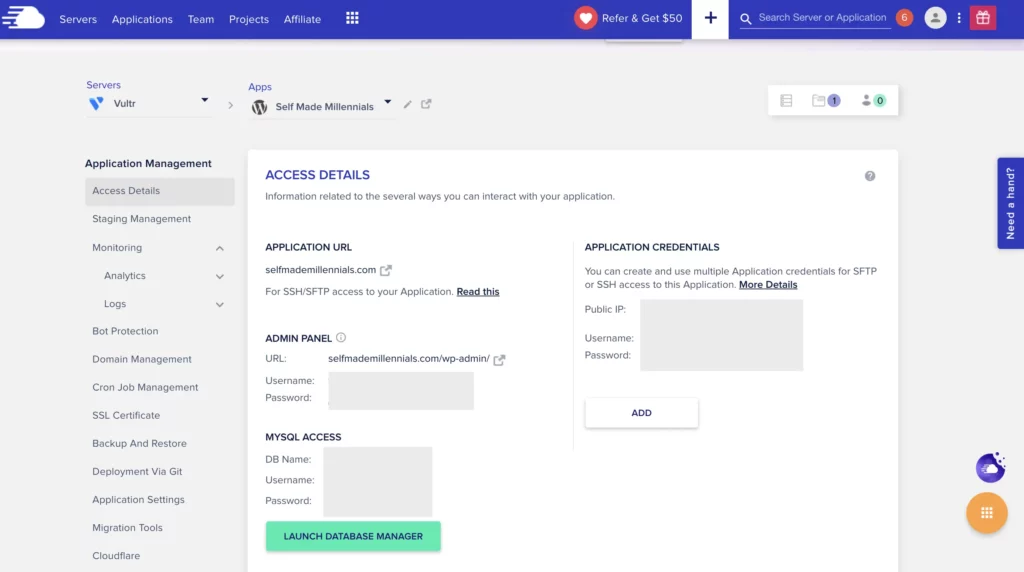
A few years back, I moved to Cloudways, and honestly, I’ve never looked back.
Now, I pay $16 a month for their dedicated hosting, and it’s been worth every penny. Their support team has also saved me more than once—like the time I accidentally created a redirect loop and locked myself out of my own site.
Choose a content management system
There are plenty of content management systems (CMS) out there, and the best one for you depends on what you’re trying to do.
Here are a few popular options:
- WordPress – Great for blogging
- Ghost – A simple way to build a website without code
- Wix – Another no-code website builder
- Shopify – Perfect for ecommerce
- beehiiv – Combines a website with a newsletter, learn more in my beehiiv review
These are just a handful of choices. There are tons of others, including AI-powered website builders.
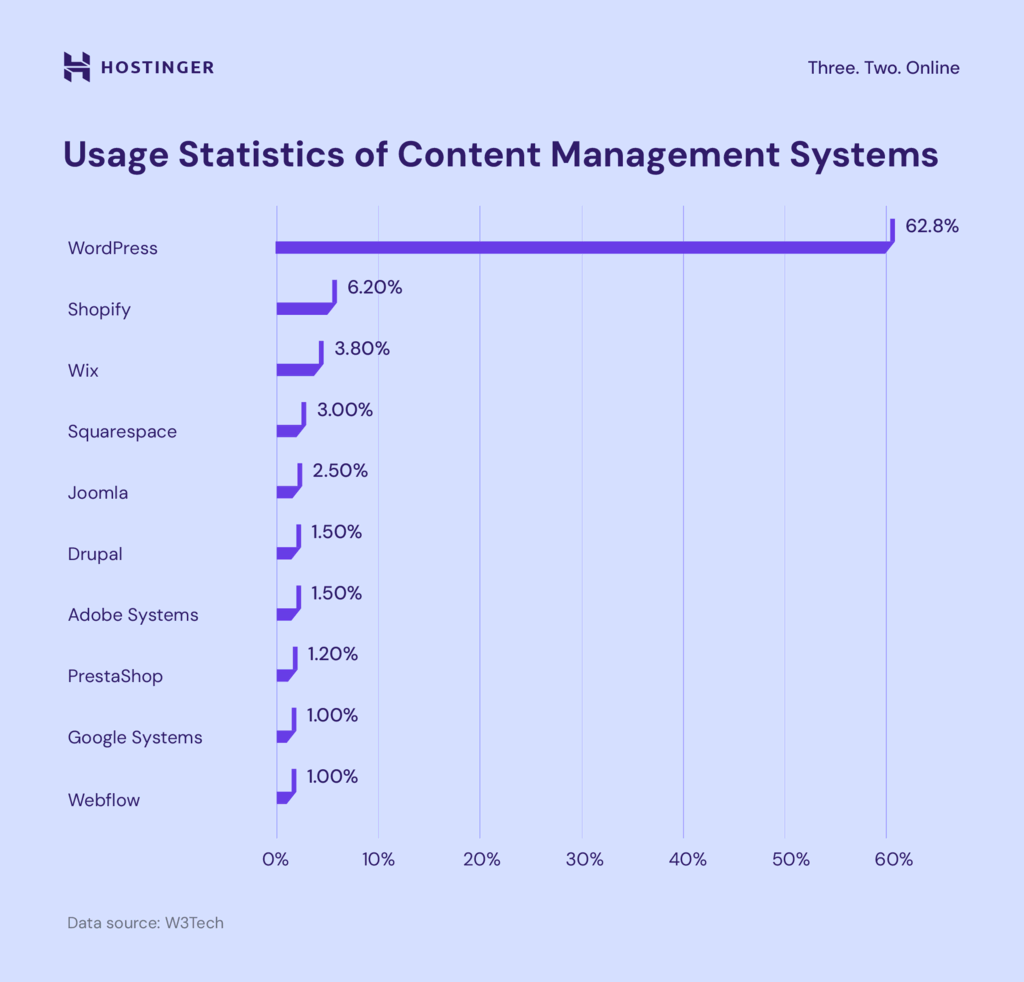
I’ve been using WordPress to start and grow my blog since 2021. It’s been (and still is) the most widely used CMS out there.
One of the reasons I love it is the flexibility. You can tweak the code, optimize it for SEO, and customize pretty much anything. That’s a big deal when you want your content to rank.
According to W3techs
Here’s a great chart from Hostinger that breaks it down visually. As you’ll see, WordPress is way ahead of the competition.
Install SEO plugins
No matter what platform you use for your website, you’ll need to get the SEO basics in place, including which pages are indexed and aren’t, how your URLs are structured, and so on.
If you use WordPress (like I do), one of the first things you’ll want to do is install an SEO plugin. This makes it easier to set up the fundamentals and avoid issues like pages being indexed incorrectly.
Two of the most popular SEO plugins for WordPress are:
- All-in-One SEO (AIOSEO)
- Yoast SEO
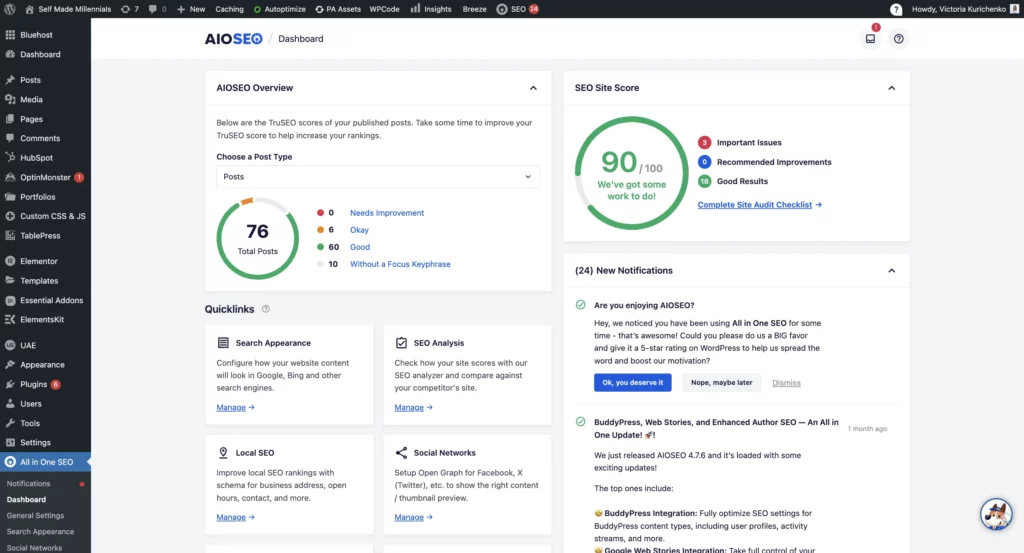
AIOSEO is super beginner-friendly, even if you’ve never used an SEO plugin before. It helps with things like adding meta tags, generating XML sitemaps, and setting up schema markup so Google can better understand your content.
I’ve been using the paid version of AIOSEO for a few years now, mostly because I wanted to automate schema markup for all my blog posts instead of doing it manually.
But over time, I’ve started using a lot more of its features.
One of my favorites is the site health checker, which gives recommendations for technical fixes. It also lets me update my sitemap and robots.txt file whenever I need to. Plus, I can control which pages get indexed.
I also use AIOSEO to optimize every page and blog post. Of course, I use other tools too, but having a solid SEO plugin in place makes a big difference.
Plan a website structure
Website structure is a vital SEO requirement for a new website.
A well-organized site makes it easier for visitors to navigate and helps search engines, like Google, quickly find and index new pages.
Here’s how I structured my website:
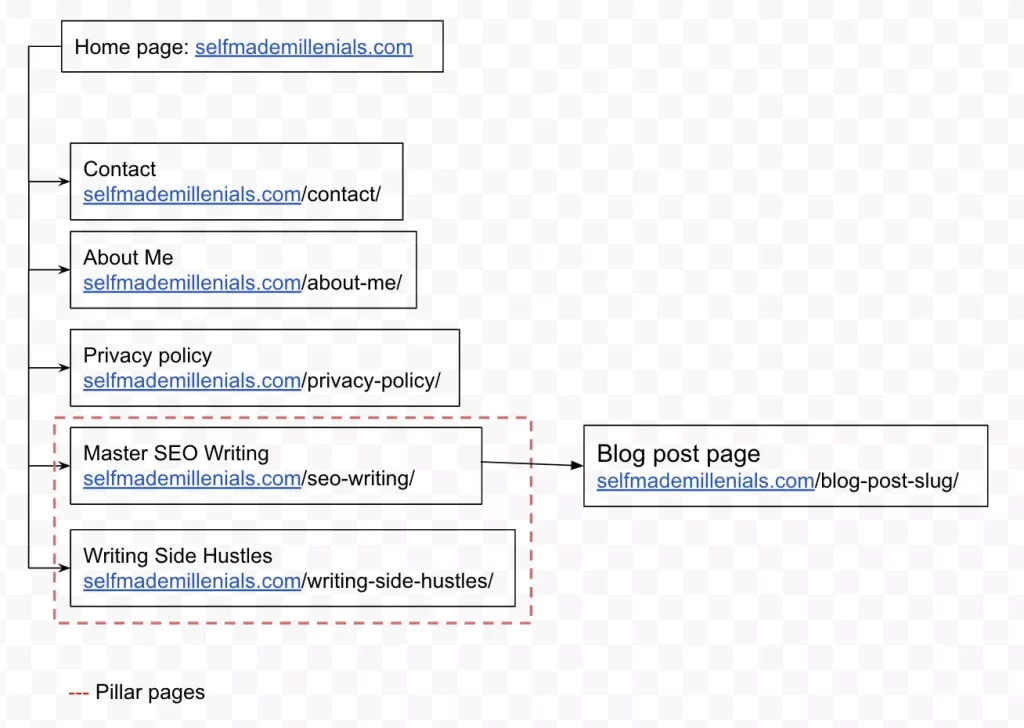
I created it as a part of the SEO plan for a new website and shared it with a developer. It follows a simple tree-like format.
Think of a website tree as a way to map out your content, highlight key pages, and ensure everything is easy to access.
Once you’ve outlined your structure, it’s a good idea to create a technical brief for your developer (if you’re working with one).
Also, explain the reasoning behind your choices. For example, I wanted my blog posts to sit at the first nesting level because it’s better for SEO. Pages higher up in the hierarchy tend to get more attention from Google.
Lastly, let your developer know you’ll be checking site speed before signing off on their work. This way, they’ll avoid adding unnecessary code that could slow things down.
Conduct keyword research
Before you create any page on your website, start with keyword research.
This step helps you figure out which topics will get you closer to your goals, whether that’s driving sales, growing your brand, or making money through affiliate marketing.
If you’re just starting out, focus on keywords that:
- Have a decent search volume, both in your target country and globally
- Your site has a realistic chance of ranking based on keyword difficulty
- Have business potential
I used to share exact numbers, but the truth is, it depends on your website. The older and more authoritative your website is, the more competitive keywords you can go after.
I gave a quick overview of my process in my niche keyword research article, but for a detailed, step-by-step guide on keyword research and SEO writing, check out my SEO ebook.
The 4th edition of my SEO ebook – fully updated for 2025!
Inside, you’ll get:
 A step-by-step system for finding, analyzing, and prioritizing keywords
My exact method for turning keywords into SEO-optimized outlines that Google loves
How to create a solid content writing plan
My best writing tips to make sure your content meets Google’s content quality requirements
Case study on how my content outranked industry giants and ranked in the top 3 for multiple keywords
Case study revealing what I actually do when my rankings drop — and how I bounce back
… and so much more.
Grab your ebook copy now and start ranking higher.
This time, I’m doing a major revamp!
I’ve improved my SEO writing process and shared even more writing tips.
Plus, the 4th edition will include:
- A case study on how my content outranked industry giants and ranked in the top 3 for multiple keywords
- A case study on what I do when my website rankings drop
- A step-by-step guide to finding, analyzing, and prioritizing primary & secondary keywords
- How to create a solid content writing plan
- How to craft SEO-friendly outlines
- My best writing tips to make sure your content meets Google’s expectations
P.S. The 3rd edition of the ebook comes as a PDF because it’s packed with charts and images. And since it’s a digital product, all sales are final—no refunds.
Create a content writing plan
Keyword research isn’t just about finding popular search terms. It’s about building a content plan that actually aligns with your business goals.
Take my content writing plan for Q1 of 2025, for example. The keywords highlighted in green are the ones I’ve already written about and published.
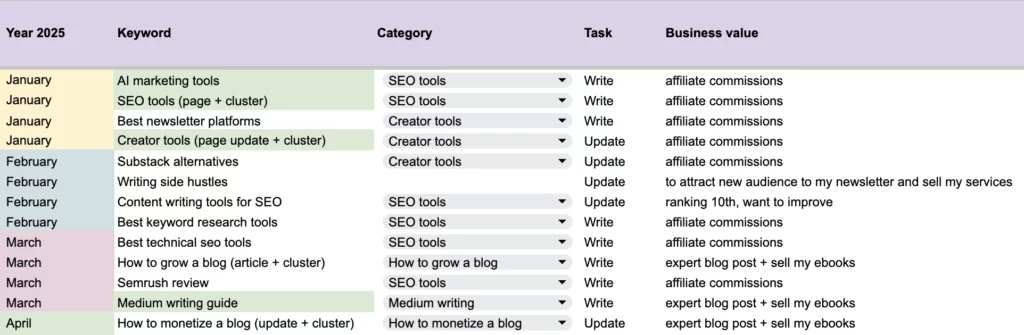
Every keyword on my list has a purpose. These aren’t just random topics.
My goal is to make $20,000+ from my blog this year, so I’m focusing on content that can help me get there.
You can check out my progress with affiliate marketing starting from January 2025 in my monthly recaps.
You should do the same for your blog.
Pick topics that align with your goals, so you’re not just writing for the sake of it but actually working toward something.
Once you’ve got that sorted, you’ll have a solid plan to follow, and then it’s time for the next step.
If you need help creating a content writing plan for your website, get in touch with me for help.
Establish credibility
As I mentioned in my article on AI SEO trends, SEO and branding go hand in hand.
What does that mean?
It means search engines like Google are likely to prioritize content from websites they see as trustworthy.
And when I say “trustworthy,” I’m talking about strong brands.
For solo creators like me, that brand is our personal identity.
So why does this matter for SEO?
Simple.
Google can’t just pick the top 10 results when thousands of similar articles are published daily.
So, how does Google decide who gets visibility?
It all comes down to authority, and that’s where your brand plays a big role.
If you’re unsure where to start, think about what makes you different.
Could it be your visuals? Or maybe the way you create content that truly connects with your audience?
I handle everything, including branding, design, and SEO writing for my website and newsletter.
Beyond my website, I’ve built my brand on Medium (where I’ve published 350+ articles and grown to 21k+ followers), LinkedIn (3,000+ followers), and Reddit.
I also make sure every piece of content I publish reinforces my expertise and gives readers a reason to trust me. That’s why I include an “About me” section at the top of every blog post.
Authority builds trust.
And trust helps with SEO.
Publish optimized content
Let’s talk about writing and optimizing your blog content in a way that actually works.
When it comes to SEO for a new website, three things matter the most:
- Fixing major technical issues
- Building backlinks
- Creating optimized content
I’ve already covered the technical side, things like making sure search engines can find, crawl, and index your site.
Now, let’s focus on backlinks and content.
Both play a big role in growing your site, but if you’re short on time or resources, start with content.
Even if your website has great authority, you won’t rank without strong content that attracts users.
Before you write an optimized blog post, keep these things in mind:
- Your main keyword
- Related keywords
- A clear outline with keyword-rich titles and subtitles
- Your personal experience on the topic
- Ideal word count
- Who currently ranks in the top 10 for your keyword
- How you can make your content better than theirs
You can learn more from the online courses on SEO. I go into detail about my SEO writing process in my SEO ebook, but here’s the gist:
Picture your article already ranking on the first page. What would make someone click on your post instead of a competitor’s?
Tough question, right? But that’s exactly what users face when scrolling through search results. You need to keep this in mind while writing.
To give you a real example, I’ll show you how I wrote a post about AI SEO tools that outranked some of the biggest industry players.
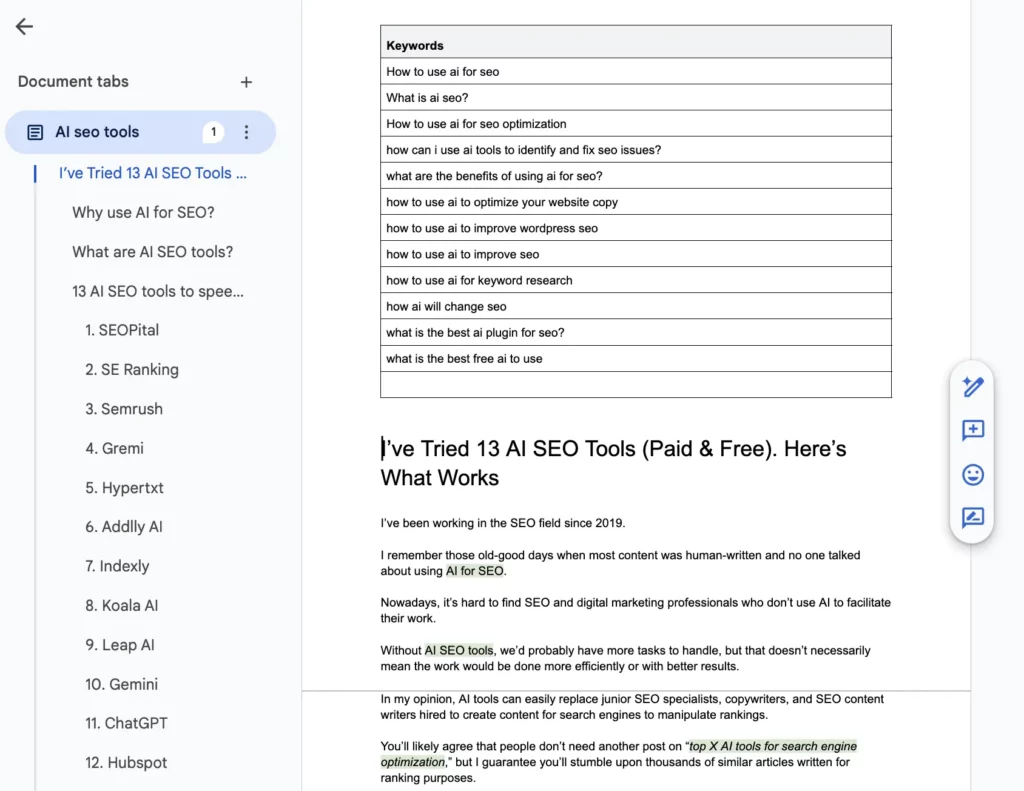
Here’s an excerpt from that post in the document before it was even published.
Notice how the article is structured? There’s an H1 title, followed by well-organized H2 and H3 subtitles. I used my target keywords in the subtitles to answer common questions readers might have.
I also highlighted my keywords throughout the article to ensure they were placed naturally where needed.
The main goal of this post? To give readers an authentic, experience-based take on AI SEO tools. Not just another generic list.
Instead of throwing together a bunch of tools, I shared my real-world experiences, added screenshots, and included performance data. That’s what made my content stand out.
Here’s how I fine-tune my content to rank well in search results. Nothing fancy, just solid SEO basics that work:
- Insert your target keyword into the H1 title tag.
- Include your target keyword in the meta title.
- Include the target or related keywords in the meta description.
- Use your main keyword and 1–2 related terms within the first 300 words.
- Structure your article properly with H1, H2, H3, and H4 headings.
- Add related keywords in subheadings.
- Every 300 words or so, naturally work in a couple of related keywords.
- Use alt tags for images, including relevant keywords when it makes sense.
- Keep your URL clean and optimized.
- Link from high-authority pages on your site to those that need a boost.
Now, about AI. Yes, I use SEO content writing tools, specifically Koala Writer AI and ChatGPT.
But I only use AI tools for editing, proofreading, or definition generation. The biggest part of my writing is done manually.
If I ever need to speed things up, I try to humanize AI-generated content so it sounds natural and engaging.
When it comes to SEO optimization, that’s all me. I’ve been doing it for years, and it’s just second nature at this point.
Track performance
You won’t really know how your blog is doing unless you track its progress.
Honestly, this is my favorite part of blogging.
Every morning, the first thing I do is check my WordPress stats, including how my website is growing, how new pages are performing, and whether I’ve earned any new affiliate commissions that need to be added to my list.
Tracking your website’s growth might seem a little boring at first, but it’s essential if you want to improve.
Here’s how you can do it:
- Google Search Console (GSC) – This tool shows if your clicks and impressions are increasing over time. You can track your entire site or specific pages and see how many keywords your blog is ranking for.
- Semrush – You can create one free project per domain, making it a great tool for monitoring rankings, organic traffic, and technical SEO issues. It also provides plenty of useful insights.
- Ubersuggest – A budget-friendly SEO tool that helps you track search rankings, research keywords, run SEO audits, and more.
- Search Atlas – An affordable alternative to Semrush and Ahrefs. It’s an all-in-one SEO toolkit that uses AI to provide personalized recommendations and improve your site’s performance.
These SEO tools give you a clear picture of your blog’s growth so you can make smarter decisions instead of guessing.
FAQ
I hope you now have a better understanding of whether it’s worth doing SEO for a new website and where to get started.
I’ve also put together a few common questions you might find helpful. But if you still have something on your mind, drop your question in the comments. I’d be happy to help!
What should I know before doing SEO for my new site?
It’s worth knowing how your content doesn’t become searchable after you hit the “Publish” button.
According to Google, every new web page you publish goes through the following process:
- Discovery (Google needs to find your site)
- Crawling (Googlebot has to crawl your pages)
- Rendering (Google processes the page to understand what users see)
- Indexing (Once processed, the page is stored in Google’s database and can appear in search results)
When the Google bot discovers a new page, it starts crawling (aka scanning) the content. As a result, your new page may or may not be added to Google’s main index.
Google’s main index had over 30 trillion pages in 2013. This number has been up an astonishing 30 times in the past five years, according to Venturebeat.
If you want to get noticed on search, your content should be part of Google’s main index. Otherwise, your chances for successful organic performance are zero.
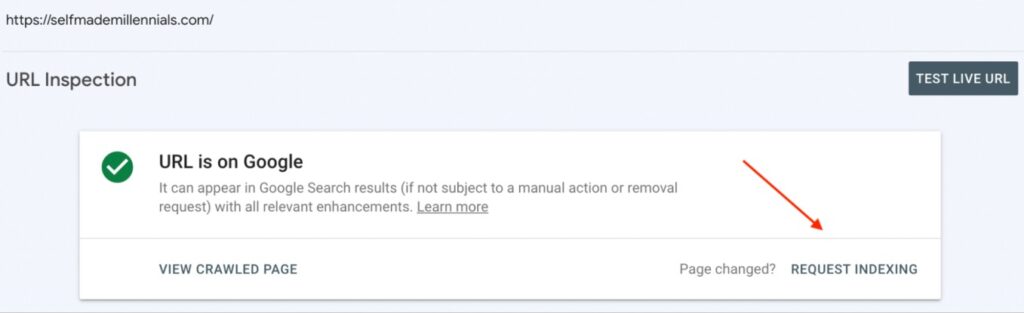
If you follow the SEO basics your content aligns with Google’s best practices, you’ll see the following happy message in Google Search Console “URL is on Google” message.”
For new websites, it might take a few days to weeks to get a page indexed. To speed up the process, you can request manual indexing in the Google Search Console (see below) or use technical SEO tools like Indexly.
What if my new web pages don’t show up in search results?
If your website does not show up on Google, check if you experience these issues.
You might struggle with discovered/crawled – not indexed issue, a no-index tag, or a messed up robots.txt file.
What SEO goals should you set for a new website?
The primary objective of any new website is to increase impressions, expand its number of indexed pages, and attract more views.
Here is my SEO to-do list for a new website to help you prioritize your efforts. It’s ideal if you work on your website as a side hustle next to the full-time job:
Monthly
- Check if you achieved your monthly SEO goals. (Plan how to speed up SEO for a new website if needed.)
- Run an SEO audit and define any critical issues to tackle the following month.
- Check your website traffic (Google Analytics) and domain ranting (use SEO tools.)
- Conduct keyword research.
- Plan at least 3–4 new optimized content pieces.
- Create a monthly SEO plan keeping in mind your quarterly goals.
Weekly
- Check your Google Analytics traffic stats.
- Check page loading speed. If it’s low, prioritize issues and start researching the solution.
- Publish a new optimized blog post. Aim for at least one article weekly.
- Build 1–2 backlinks.
- Check where you stand with your monthly website goals. I recommend setting measurable and achievable goals for three months, like traffic increase.
Daily
- Check website impressions in Google Search Console.
- Check website indexability in Google Search Console. Fix issues if there are any and submit pages for reindexing.
- Write at least 500 words for optimized content production.
- Grow your personal brand and promote your website on Linkedin, Reddit, etc.
The above-mentioned best SEO strategy for a new website is straightforward and beginner-friendly.
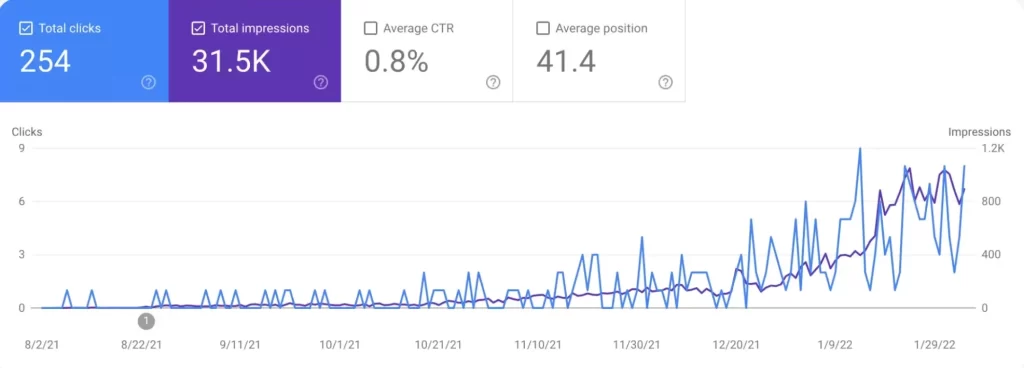
I achieved the following performance results in the first six months of working on my website next to my full-time job.
Let me know if it works for you in the comments below.

Join the newsletter for actionable SEO tips, case studies, and a behind-the-scenes look at my affiliate marketing journey.
No spam. Unsubscribe anytime.

0 Responses
Thanks for sharing this guide on how to create a successful website while focusing on your webpage message! SEO is indeed highly important as this helps you gain more traffic. However, do you think SEO is as important when it comes to small brands? Especially for those with a limited marketing budget.
It’s an awesome rationalization about search engine optimization. It’s very certain and enables me to make a better. thank you for sharing.
I’m trying to set some clear, SMART objectives for my new site. I’d like to increase organic traffic, but obviously percentages are going to be ridiculous as anyu increase on ) looks impressive even if it’s just 1 person (100% increase!) so how can I create a measure for increasing organic traffic for a new website without it seeming ridiculous?
Great article by the way!
Its Very Helpful