I’m glad you found your way to my article because this isn’t your typical post about AI tools for marketing.

Before writing this blog post, I’ve spent some time reviewing the top-ranking articles.

And honestly? 

Most of those posts just list a ton of tools, many of which the authors likely haven’t even tried themselves. Plus, I’ve seen “AI tools” on those lists that aren’t even built for marketing!

But I’m not here to give you another generic list. I’m here to share my real-world experience using AI for marketing, SEO, and content creation as a content creator and solopreneur with an SEO background. 

I’ve got case studies, real-world insights, and practical tips to show you exactly how these tools work, the types of content they can create, and how they can level up your marketing efforts.

Oh, and if you’re wondering whether AI-generated content can actually rank in search results, spoiler alert: it absolutely can!

Below, I’m sharing my (admittedly subjective) list of the best AI marketing tools. Whether you’re a solo marketer or part of a team, these tools can help streamline your workflow.

Since I’ve personally tested all these platforms and tools, I’ll also share some of my experiences and show you how AI-generated content ranks on Google.

Let’s dive in!

Here’s a table of contents for your convenience:

What is AI used for in marketing?

AI has already been widely used in online marketing. 

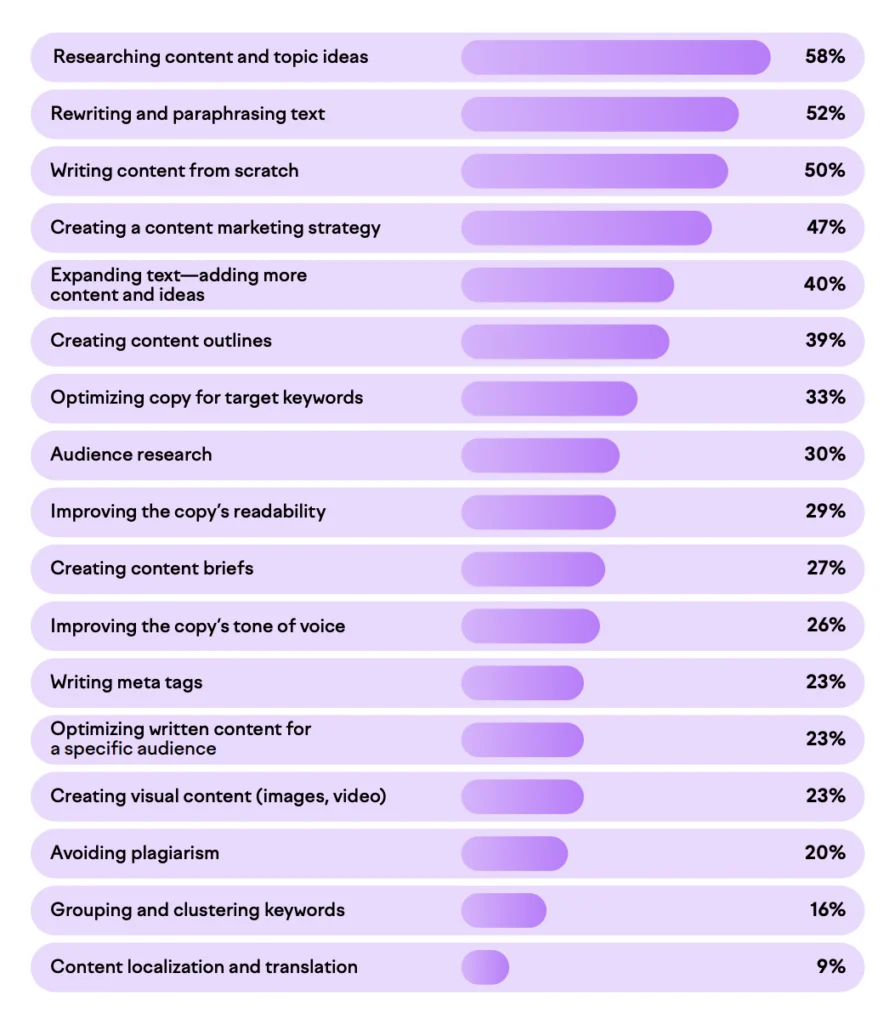
According to Semrush’s AI Content Marketing Survey, conducted with more than 2,600 businesses globally and across many different industries, here’s what marketers actively use AI for:

what marketers use AI for

As a content creator and solopreneur, I rely on AI marketing tools to help me get things done faster and manage more tasks, especially when deadlines are tight.

Similar to Semrush’s findings, I also use AI tools primarily for rewriting and paraphrasing high-quality content. Since I know my field of expertise quite well, I occasionally use ChatGPT and similar tools to do research. I see a lot of potential and like experimenting with different prompts to speed up and improve my research process.

If you haven’t started using AI for marketing, perhaps you can start doing it this year!

My curated list of the best AI marketing tools

  1. Semrush SEO Toolkit  — An all-in-one SEO and marketing tool that can analyze your brand’s presence across platforms like ChatGPT, SearchGPT, Gemini, and Perplexity.
  2. Figma AI — Lets you generate site designs by simply writing prompts, which makes the entire process much faster and more beginner-friendly.
  3. Holo AI — Turns your product pages into ads, emails, and social media posts.
  4. Orshot – Automate image generation for content marketing with templates, API, and integrations.
  5. beehiiv  — A newsletter platform for content creators to grow and monetize their target audiences and build websites code-free.
  6. Koala AI — An AI tool for blog post generation, where you can customize an outline and the tone of voice and choose different languages for content generation.
  7. Indexly — An advanced but easy-to-use tool to speed up your website’s indexability and analyze technical issues.
  8. Keywordly AI — Automates the content creation from keyword research and clustering to competitor keyword gap analysis, content generation, and publication.
  9. Grammarly — It’s an AI-writing assistant and an editor to correct your grammar, spelling, and punctuation.
  10. ChatGPT— My top free tool for giving content a natural, human touch, digging up information, writing social media posts, and brainstorming catchy titles.

Let’s review every tool in detail. 

P.S. This post includes a few affiliate links. If you decide to try any of these tools, I might earn a small commission at no extra cost to you. Just being upfront about it! I’m only recommending tools I’ve used myself and truly believe in. 🙌

1. Semrush SEO Toolkit

  • Best for: In-house marketing teams, agencies managing multiple websites, individual site owners, businesses willing to track their AI mentions.
  • Best features: AI Assistant and its customized recommendations to your website, Keyword Magic Tool, On-Page SEO Checker, SEO Audit, Keyword Strategy Builder, AI SEO Toolkit, and more.
  • Pricing: Starts at $139.95 per month. 14-day free trial for Semrush’s SEO Toolkit.
  • Semrush One starts at $199/month and includes the traditional SEO Toolkit + AI Visibility Toolkit. 14-day free trial.
Semrush August 2025

Semrush was actually the second SEO tool I ever used after Ahrefs when I first started my SEO career. Since then, it’s been one of my go-to tools for managing both my own site and client projects.

Over the years, though, Semrush has evolved a lot. It’s definitely not the same tool it used to be.

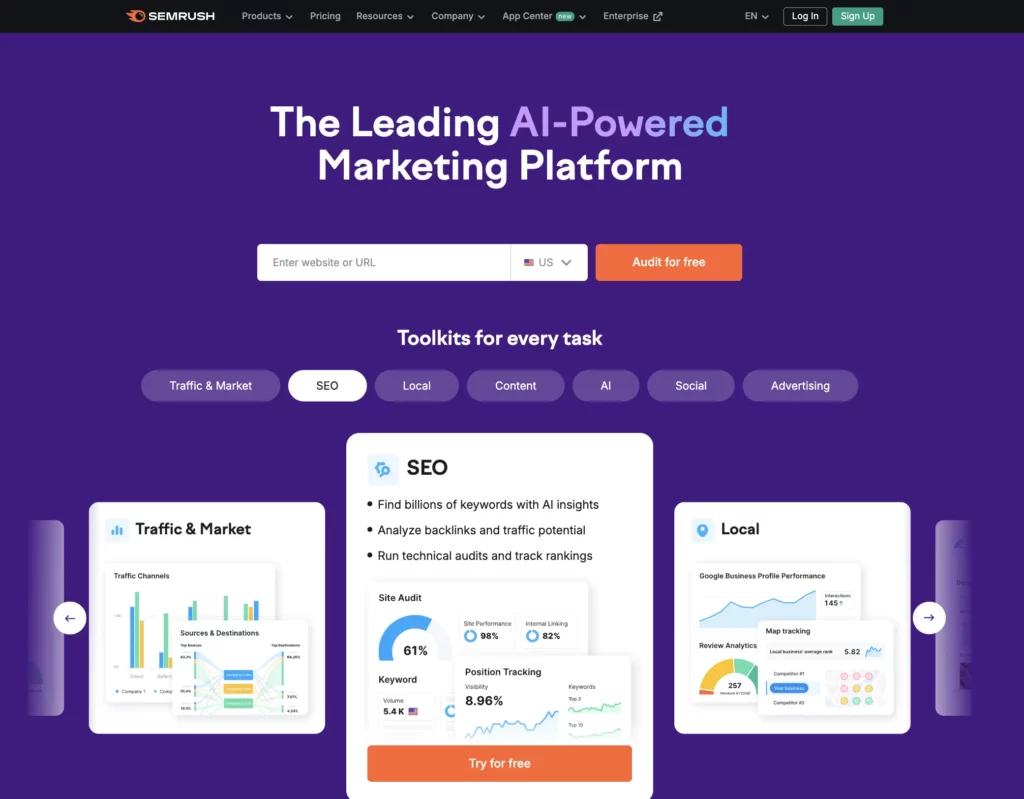
Today, it offers 55+ features for almost every marketing task you can think of, grouped into seven toolkits, so you can easily find what you need without getting lost.

Here’s a quick rundown of what each toolkit does: 👇

  • SEO Toolkit: Everything from keyword research and site audits to link building and competitor analysis, basically, all the essentials for building and improving your SEO strategy.
  • Content Toolkit (formerly ContentShake AI): Helps you plan, create, and optimize content more efficiently.
  • AI Visibility Toolkit: It’s a new toolkit that lets you track how your brand shows up in AI Overviews and LLMs like ChatGPT or Perplexity.
  • Social Media Kit: Perfect for managing all your social accounts in one dashboard.
  • Advertising Toolkit: It’s helpful for researching, planning, launching, and optimizing online ad campaigns.
  • Local Business Kit: It helps manage your Google Business Profile, track online reviews, and keep your local presence strong.
  • Traffic and Market Toolkit: It helps you analyze competitor strategies to understand what’s driving their growth.
  • Semrush One combines two toolkits in one plan, giving you all the insights and tools you need to succeed in search engines and AI chat platforms.

If you’re curious to dive deeper, I’ve written a full Semrush review that covers all these features in more detail.

Semrush One functionality

Semrush’s old pricing plans, Pro and Guru, now only include the SEO Toolkit. To use it, you’ll need at least the Pro plan, which costs $139.95/month.

Before signing up, I’d recommend trying the free trial first. You’ll get a feel for the tool and see if it’s actually worth the price.

If you’ve been thinking about trying Semrush Pro, here’s a little perk: My partner links give you a 14-day free trial to Semrush Pro and a 14-day free trial to Semrush One instead of the usual 7 days. Just a small way to get more time to explore and see if it’s a good fit! 😊

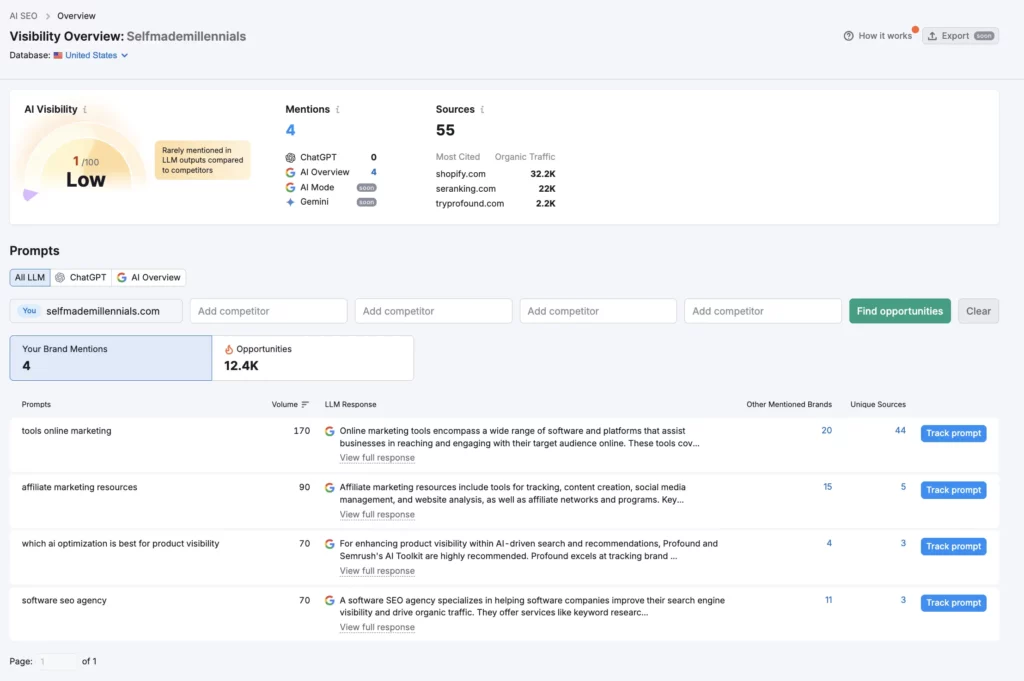
If you’re curious about AI-driven SEO, Semrush now offers a separate AI SEO Toolkit for around $100/month. It automatically checks how your brand appears across AI search engines like ChatGPT, SearchGPT, Gemini, and Perplexity.

In simple words, it shows how AI platforms see your brand compared to your competitors and gives practical tips to improve your content, products, and marketing. That way, you can show up more often in AI-powered search results.

If you’re a content creator or website owner, this is definitely a tool worth adding to your stack.

AI visibility tracking for SEO

2. Figma AI

  • Best for:  content creators, website owners who want to redesign their sites themselves, UX/UI designers, and marketers who work with visuals.
  • Best features: Create beautiful designs with prompts. No coding required.
  • Pricing: Figma has a free Starter plan, which is suitable for personal projects and basic design needs (with limited AI credits). For bigger projects, the Professional plan costs $20/month per full seat and gives you unlimited files, team libraries, an advanced Dev Mode, an MCP Server, and 3,000 AI credits/month. There are also Organization and Enterprise plans if you need more.
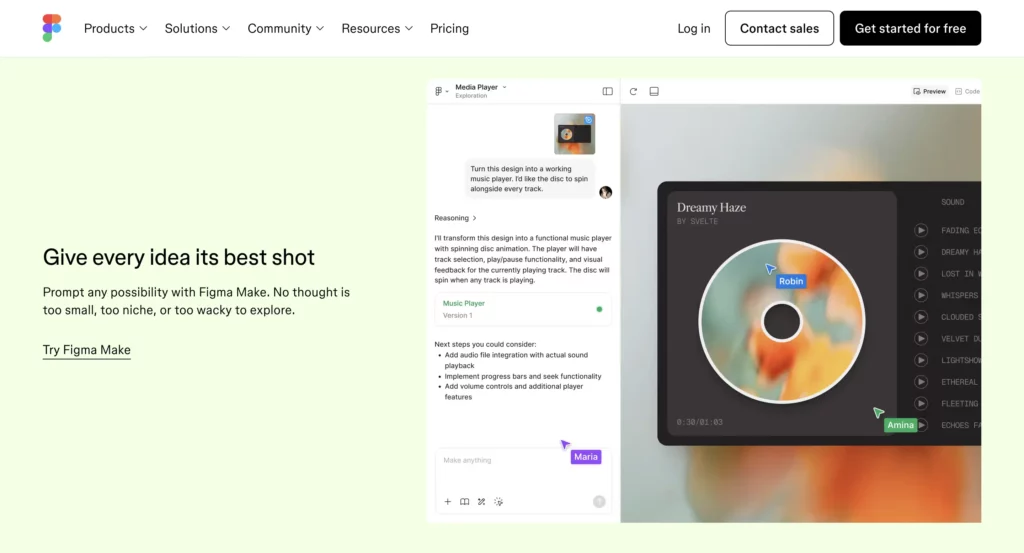
Figma AI marketing tool

Figma is a cloud-based design tool that can help you create websites, visuals, and UI/UX layouts without any coding.

I first discovered Figma back in 2019 when I joined a user experience design agency. At that time, I mainly used it to create visuals for blog posts.

Since then, Figma has changed a lot and in a really good way.

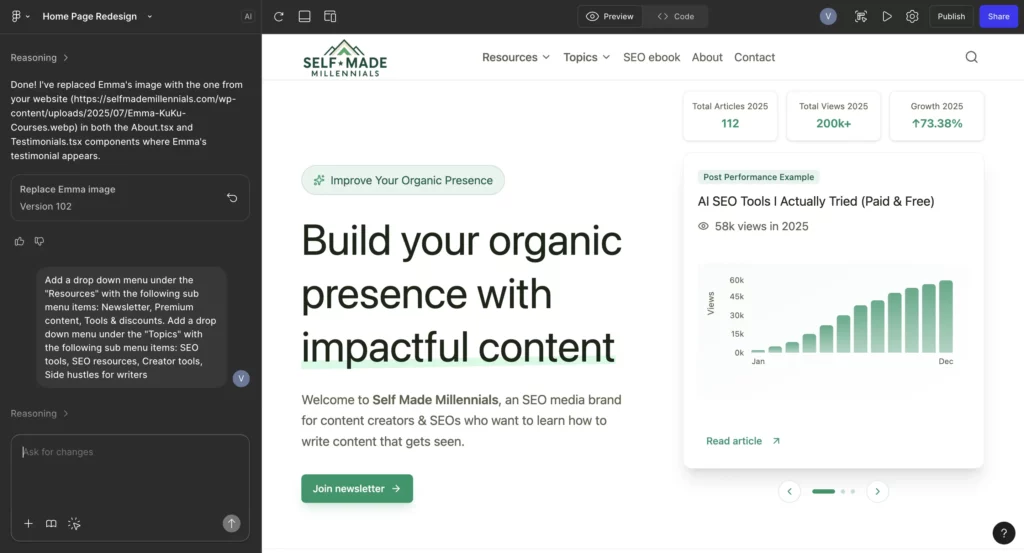
I’m recommending this AI marketing tool because I redesigned my entire website with Figma AI and saved thousands of dollars I would have spent on a professional designer.

Instead of trying to explain my ideas to a designer, requesting multiple edits, and waiting for different mockups, I simply described my website design ideas using a prompt and watched Figma AI bring them to life within seconds.

And honestly, it did an amazing job!

Overall, it took me about a week to design my website’s core pages, spending roughly 3–4 hours per page.

Below, you can see a screenshot from one of my Figma designs, where I created a brand-new homepage for my website (which is currently in development).

Everything you see there came from a conversation with Figma AI that resulted in a fully designed page. The only thing I couldn’t generate was the logo.  I had to use a different tool for that. I also provided specific color codes from Figma’s Color Palette. You don’t have to do this because Figma can generate colors on its own, but I wanted the exact brand colors to be used.

Home page redesign with Figma

I paid only $20 for a full seat of the Professional plan and designed the following pages:

  • Home page
  • About page
  • Two service pages
  • Ebook page
  • 404 page
  • Contact page
  • A blog post template

Later, I had to add two developer seats so my developers could access Figma and implement the designs. That’s why my total bill for the second month increased to $73,  which included two developer seats at $30/month, one full seat at $20/month, and an extra $23 in prorated fees for adding the additional seat mid-month.

Depending on your team size, Figma’s cost can add up quickly, so make sure to estimate your budget before you commit to it.

If you’re on the Professional plan like me, Figma says 3,000 AI credits should be enough for 50–70 design prompts. I’m pretty sure I used more than that while designing all my pages.

Going over the limit is free right now, but Figma mentioned on their pricing page that they plan to introduce paid add-on credits for heavy users. Until then, they won’t strictly enforce credit limits for full seats.

This means that in the future, Figma will start charging for extra credits. So, AI-generated designs will become more expensive. But even with that in mind, it’s still much cheaper (and faster) than hiring a human designer.

And I’m definitely not the only creator trying to design a website solo. Karina from Your Marketing Bowl shared that she used Figma to “figure out my website’s branding.

Clearly, Figma has a lot more to offer than most of us realize and we’ve barely scratched the surface of what it can do.

Holo AI

  • Best for: Content marketers, solopreneurs, small teams, startups, and marketing agencies.
  • Best features: AI Ad Generator, Socials Generator, Brand DNA.
  • Pricing: $39/month or $19/month (if billed annually at $228). Comes with a 14-day money-back guarantee.
Holo ai marketing tool

Holo AI is an AI-powered marketing tool that can help you create branded marketing campaigns in 95 different languages, including ad creatives (text and video), social media posts, and email campaigns, to name a few. It’s said that Holo is trained on 10M+ creative assets and 19,000+ top-performing ads.

The company behind Holo AI comes from Lithuania. Their team is young and ambitious, full of energy and creativity. I always love seeing how the drive of young founders can turn into such powerful tools like this one! 

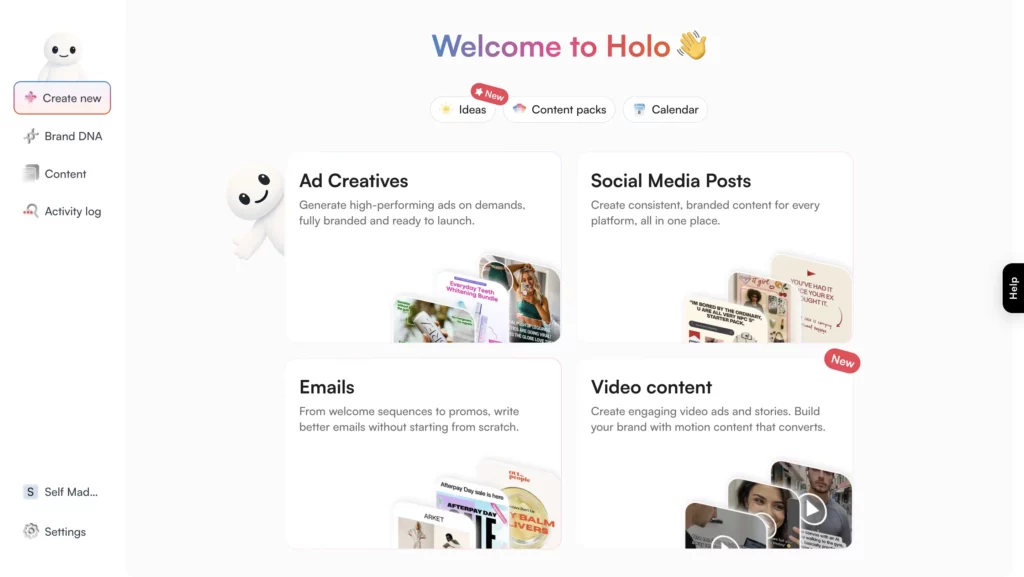
Here’s a quick overview of the Holo AI features: 

  • AI Ad Generator — This feature can help you create ad visuals and copy in minutes.
  • Socials Generator — Generates posts for platforms like LinkedIn, X, and Instagram.
  • Emails Generator — This one generates email sequences and newsletters. 
  • Videos Generator — This feature can help you turn your ideas into video ads and clips.
  • Brand DNA — It’s where Holo learns your brand’s voice, visuals, and product details.

When you first sign up with Holo, you’ll go through a setup process. Holo will ask you to share details about your brand, like your logo, colors, tone, and the products you sell. These details are essential for generating content that feels like you.

Therefore, I suggest taking some time to do it wisely. You can always update or add new information later, for instance, uploading a content mood board or refining your brand story inside the Brand DNA tab.

How Holo AI works

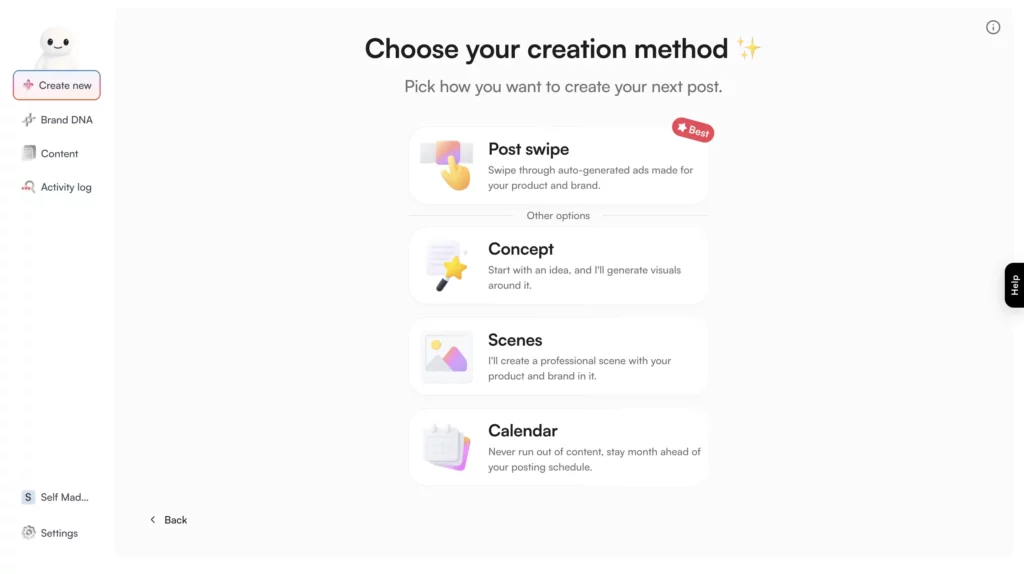
Once you’re set up, Holo gives you a few ways to generate content:

  • Post Swipe (most popular)
  • Concept
  • Scenes
  • Calendar
Holo Content Creation

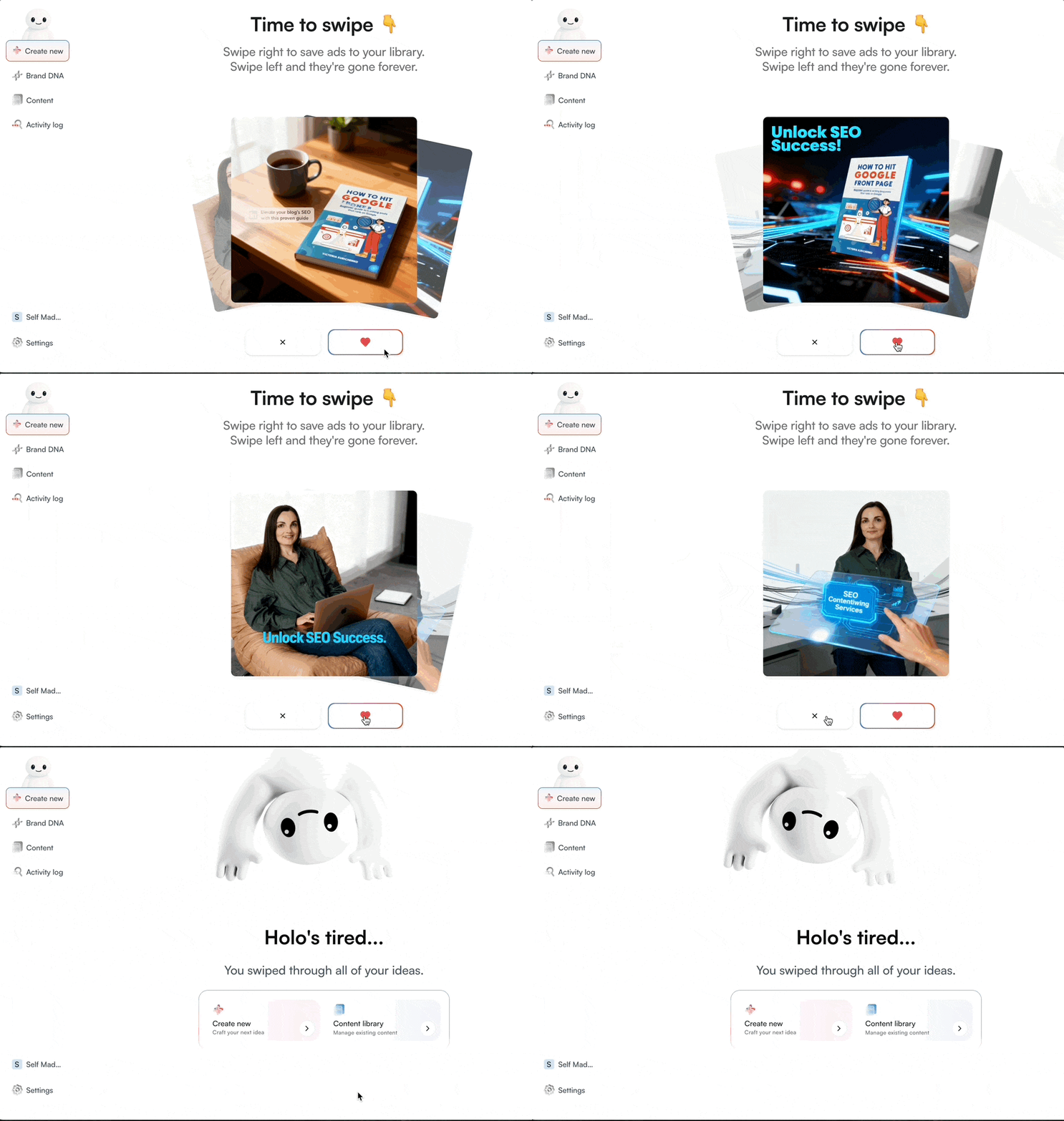
I tested the Post Swipe feature because it seemed like the most popular way to get started.

I wanted to create eye-catching LinkedIn posts promoting my SEO ebook. I uploaded a few images from the ebook and gave Holo a short prompt. The rest was up to the AI.

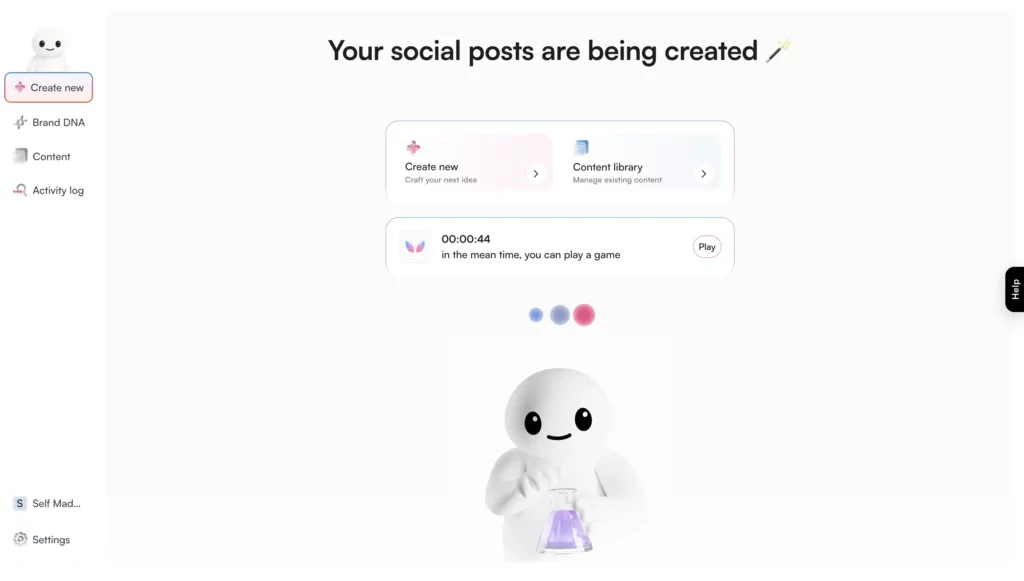
After hitting “Generate,” it takes 50 seconds for Holo to generate a creative based on your requirements. While Holo is working, you can grab a coffee or scroll through a few reels.

Holo generating social post

Holo then generated several creative variations based on my input. I could easily pick my favorites, edit them if needed, and download them for promotion.

All your favourite creatives are saved in a content library, which makes editing and reusing them super convenient.

To help you better understand how the feature works, I’ve created an animated image below.

Content generated by Holo

My experience

In my experience, Holo is much more effective when generating content related to your products that you’ve earlier added to your Brand DNA, especially if your products are described in detail.

Holo isn’t flawless, though. Sometimes, it misunderstands my prompts, mixes languages, or makes tiny spelling mistakes. To avoid this, I recommend clearly specifying the language you want to use for content generation.

I’ve also reached out to the Holo team about these issues.  Here’s their response:

“Our AI is still learning and, honestly, it’s not perfect yet. You might need to tweak the phrasing or regenerate responses to perfectly match your brand voice. We’re releasing regular updates based on what early users are telling us – each one makes the system faster and more accurate.”
Aleksandras Urbanavičius

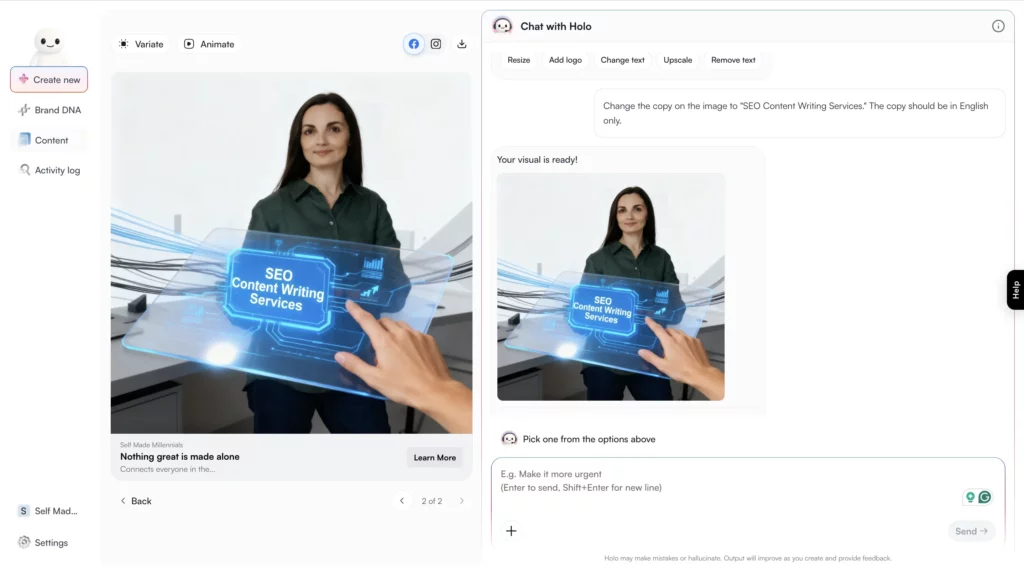
If you happen to have spelling or any other errors on the generated images, you can simply use Holo’s “Edit” feature to improve your content. Their AI-powered agent understands pretty well what needs to be done.

In my case, I requested to change the copy on the banner image since it had spelling errors. Holo did a great job fixing it!

Holo AI chat

Overall, Holo AI does what it promises. It can help you quickly generate branded visuals and written content for your products.

It works well if you want to speed up your content creation process or if you’re running multiple campaigns and need a creative boost.

Keep in mind that it can take a bit of time to generate visuals, and the results occasionally miss the prompt’s intent. But given its potential and solid output quality, these are minor issues, in my opinion, for an evolving product.

Holo AI pricing is $39/per month or $19/month (if billed annually at $228). There’s no free trial, but you get a 14-day money-back guarantee, which is a nice safety net if you want to test it out risk-free.

4. Orshot

  • Best for: Marketing agencies, brands, content marketing teams, and content creators.
  • Best features: Orshot Design Studio, Orshot AI Template Generator.
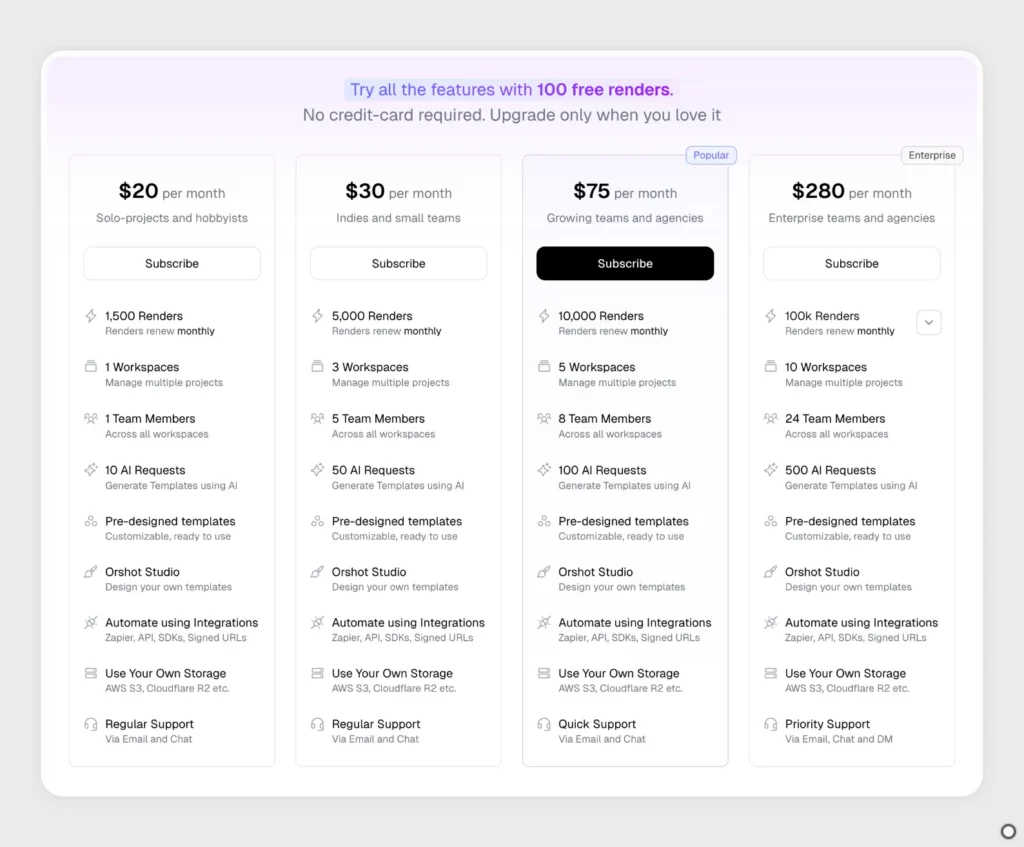
  • Pricing: Starts at $20 per month for hobbyists, which includes one user seat, 1,500 renders (aka credits), 10 AI requests, customer support, and more. There’s also a free plan that includes 100 renders to help you test the tool. No credit card required to get started.
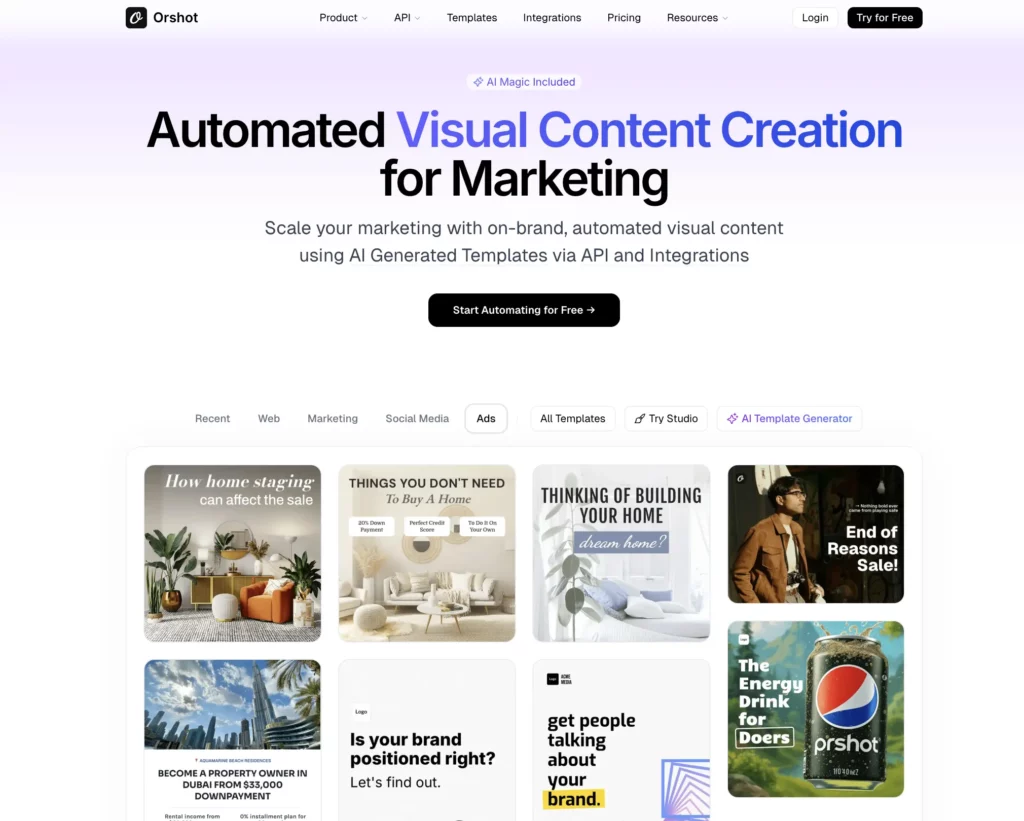
Orshot AI Marketing tool

Orshot is an AI marketing automation tool that can help you create visuals like social media posts, blog banners, product mockups, and more using customizable templates.

Before adding Orshot to this post, I did a bit of research to understand what the tool is all about and what users think.

Turns out, it’s been growing steadily! Here’s a tweet from Rishi from May 2025, sharing some updates:

    • “Rendered 10k+ images
    • Average render time from 6.1 → 4.5 seconds
    • Crossed $$$3-digit MRR”

Actually, Rishi is quite active on Twitter, sharing the latest updates on Orshot. Definitely worth following him if you’re curious about the tool’s progress. 

That’s a great sign that the product is growing and users find it helpful:

“My brands can now post 100 times per day on auto-pilot thanks to Rishi and his amazing tool, Orshot. I’m going to automate so much content my competition will think I have a team of 10 marketers.“

After learning what others say about the tool, I’ve also created my own account with Orshot to share my personal opinion and experience with you.

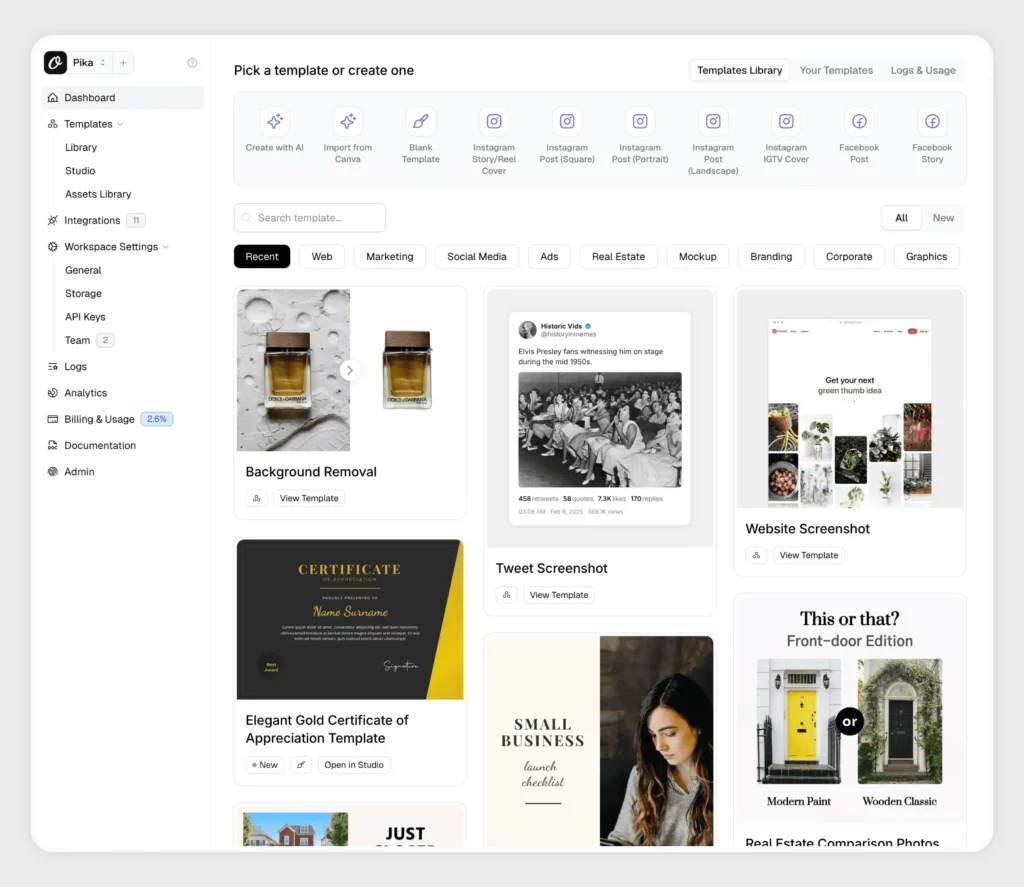
After you sign up with Orshot, you’ll land right on the dashboard. If you’ve used Canva before, it’ll probably feel pretty familiar.

From there, you can choose from a bunch of templates made for all kinds of projects. Or, if you want, you can even create your own templates using the AI Template Generator.

Orshot dashboard

There’s so much you can do with Orshot.

Honestly, the possibilities are endless thanks to their powerful tools. Here are just a few things that you can do:

  • Remove backgrounds from images with just 1 click (I used to do it with Canva Pro)
  • Resize images automatically to fit any new canvas
  • Dynamically generate images from your Airtable data without leaving your Airtable account
  • Auto-post your Tweets from X to Instagram
  • Auto-generate dynamic images from your Figma designs
  • Generate design templates from prompts and existing designs
  • And there’s more!

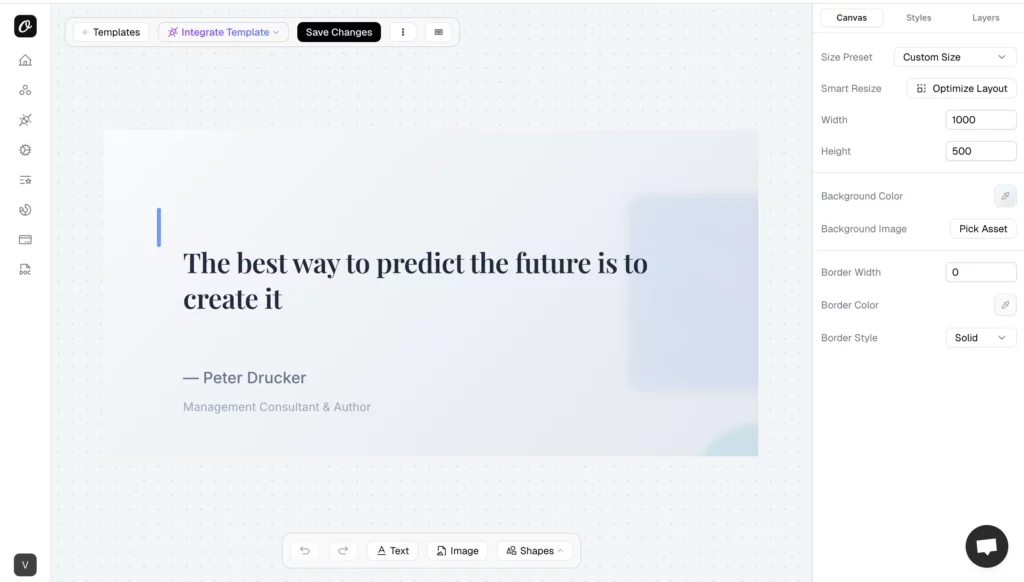
For example, I recently used their AI Template Generator to make a design for expert quotes. It literally took me 30 seconds. All the elements are customizable and can be adjusted to your own brand’s kit with Orshot’s Assets Library. There you can store your brand’s assets for quick designs like logos, icons, custom fonts, and brand colors. 

AI image generation with Orshot

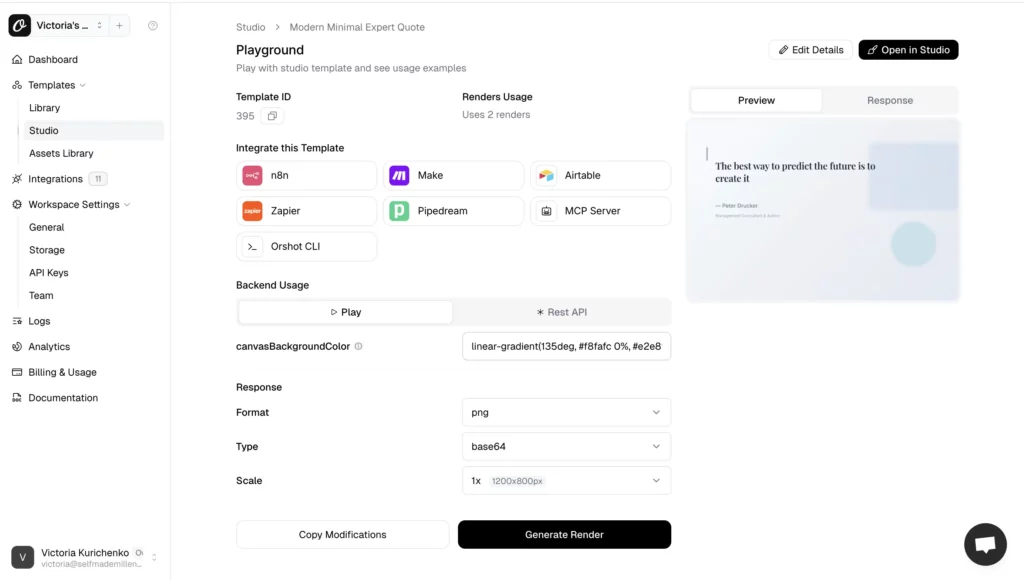
Once your template is ready, you can start connecting it with different tools.

For instance, if I were working on a website redesign in Figma, social media templates, or marketing banners, I could use the Orshot Figma Plugin to import my designs into Orshot and use them as templates

Orshot AI for marketing tool

You can connect Orshot with your favorite services using major automation tools like: 

  • Zapier
  • Make
  • Airtable
  • N8n
  • SDKs (Software Development Kit)
  • Pipedream
  • MCP Server

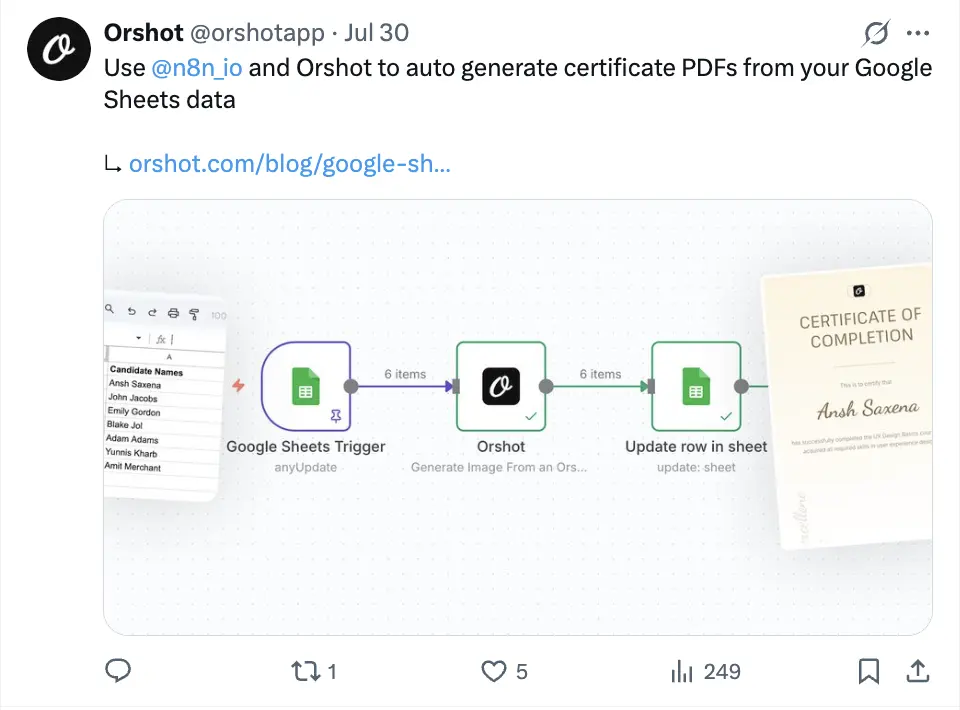
For example, you can integrate Orshot with n8n to automatically generate course completion certificates from Google Sheets. How awesome is that? I remember back in 2019, when I was helping run both offline and online design courses, this was something a designer had to do manually. Now, you can automate it easily and save a ton of time and effort.

Orshot integration with n8n

If you are interested in the tool, you can try Orshot for free with their free plan that doesn’t require you to link a credit card. Once you create an account, you’ll get 100 renders (aka credits), one workspace, one user seat, and five AI requests for image generation. 

If you like the tool and need more capacity, you can upgrade to one of their plans, starting from $20 per month for a solo plan. 

Orshot pricing

Give Orshot a try for free and see how it fits your needs. And if you decide to upgrade, use this discount code, SMM10, to get 10% off for your first six months!

5. beehiiv

  • Best for: Marketers and content creators willing to grow and monetize their audiences.
  • Best features: Website Builder, Recommendations Tool, Paid Subscriptions, Boosts.
  • Pricing: beehiiv is free for up to 2,500 subscribers, but if you want to benefit from its powerful audience growth and monetization features, the monthly plan starts at $49. There’s a 30-day free trial
beehiiv 2025

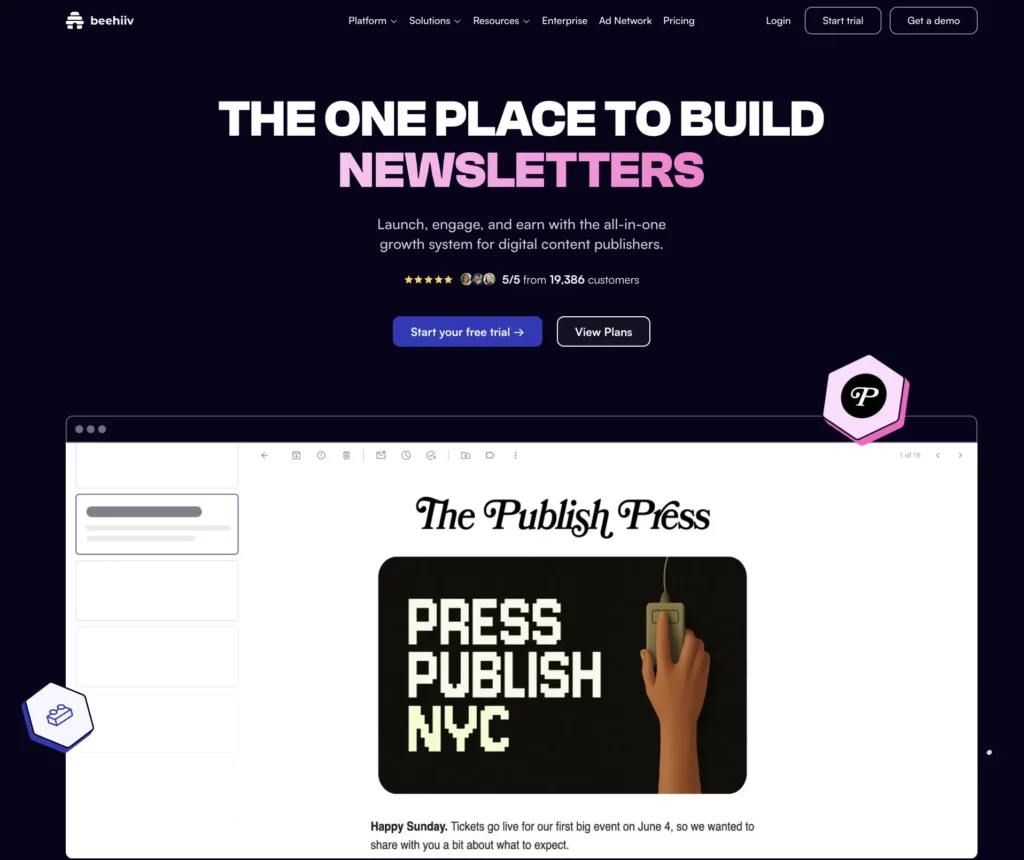
beehiiv is an easy-to-use platform that helps you create, grow, and monetize your newsletter. It’s packed with tools for audience segmentation,  writing email campaigns, managing customer interactions, and even earning money, all in one place!

I’ve been using beehiiv since January 2024, and honestly, I think it’s a must-have tool for solo creators and businesses looking to nail their marketing game.

Let me explain why I feel this way and share some results from running my newsletter on beehiiv for a year.

Launched in 2021 as email marketing software, beehiiv has quickly evolved into a powerhouse for audience growth. It offers features like:

  • No-code website builders
  • SEO features to let your website rank in search results and AI agents
  • A possibility to publish your email content as posts and optimize them for ranking
  • Multiple features to incentivize people to subscribe, including Recommendation tools, a Referral Program, and Boosts
  • Newsletter monetization features, including sponsored ads from brands and Boosts, payment for referring new subscribers to other creators
  • Detailed marketing analytics to track your best-performing content, open rates, click-through rates, conversion rates, and how you acquire subscribers
  • Campaign optimization and audience segmentation
  • Subject lines generation with AI

I’ve been diving deep into all these features and shared my hands-on experience in a detailed beehiiv review. If you want to grow and monetize your audience, this could be just what you need.

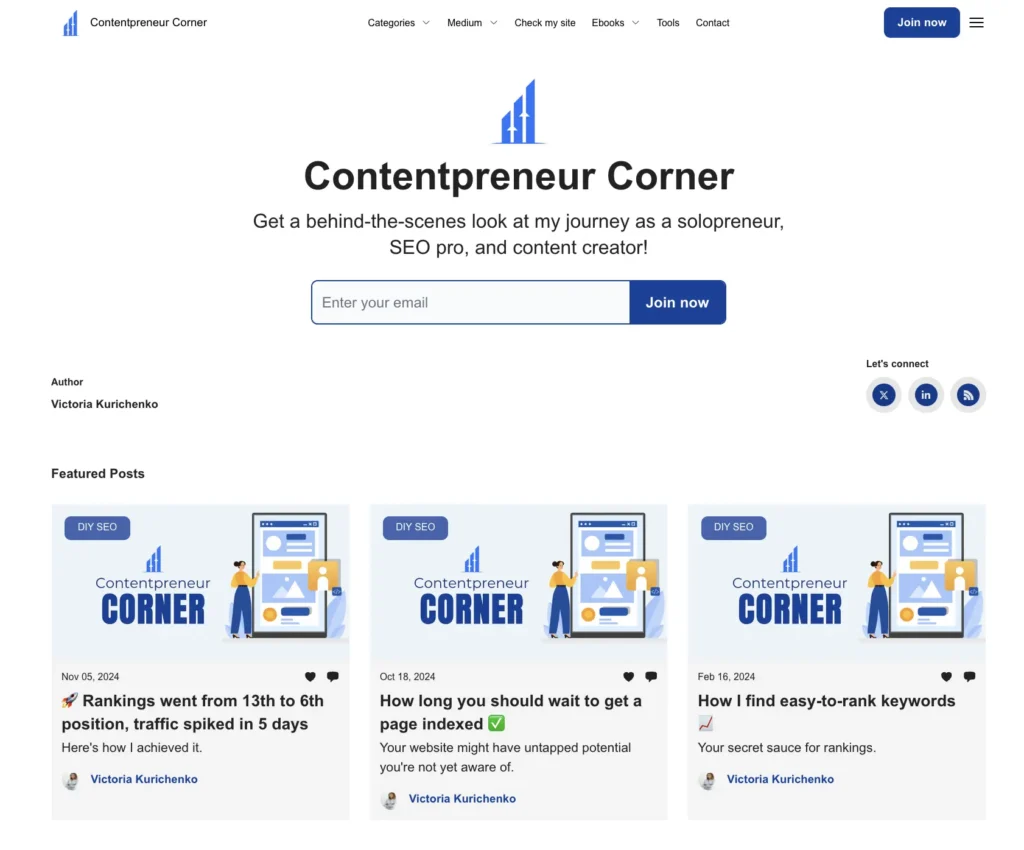
Here’s a peek at what my beehiiv site looks like, complete with an opt-in form to collect email addresses!

beehiiv website example
My no-code website built using beehiiv.

I host my site on a subdomain, so most people don’t even realize it’s powered by beehiiv.

The customization options are also pretty decent. You can tweak everything from fonts to layouts to make it truly yours.

Every newsletter I send gets posted on the website, so readers can catch up anytime. Plus, beehiiv includes subscriber pop-ups that make growing your audience a breeze.

I’m still a small creator, earning about $100 a month with beehiiv’s Ad Program and Boosts.

But plenty of creators with large audience segments are pulling in three figures and more every month.

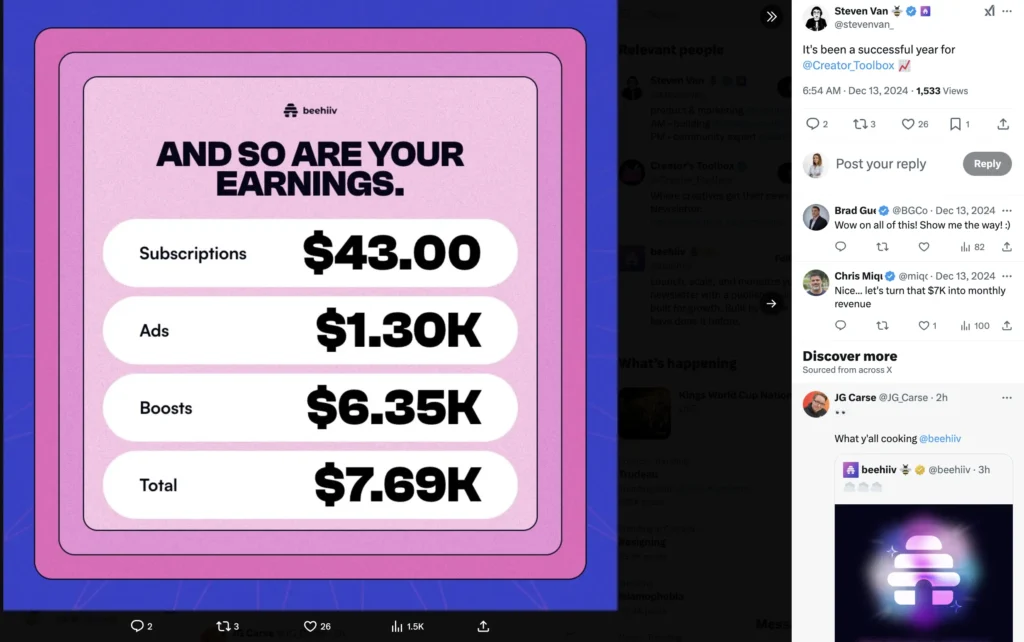
Just look at Steven Van, beehiiv’s product and marketing specialist, he’s been crushing it with just one of his newsletters!

beehiiv monetization example
A screenshot from Steven Van's post on X (former Twitter).

There are a few more things I want you to know about beehiiv, in case you are interested.

beehiiv has a free version, so you can use it for free, but it has limited functionality.

If you want to benefit from its powerful features, including a recommendation engine and monetization tools, you’ll have to upgrade to one of its paid plans. 

 The most affordable plan starts at $49 per month for 1,000 subscribers.

6. Koala AI

  • Best for: Content writers and website owners who want to speed up creating optimized brand content.
  • Best feature: KoalaWriter, Koala Images.
  • Pricing: Starts at $9 monthly for 15,000 generated words, which is about three long-form articles. Plus, you can try it out by generating one article for free.
what is koala writer AI

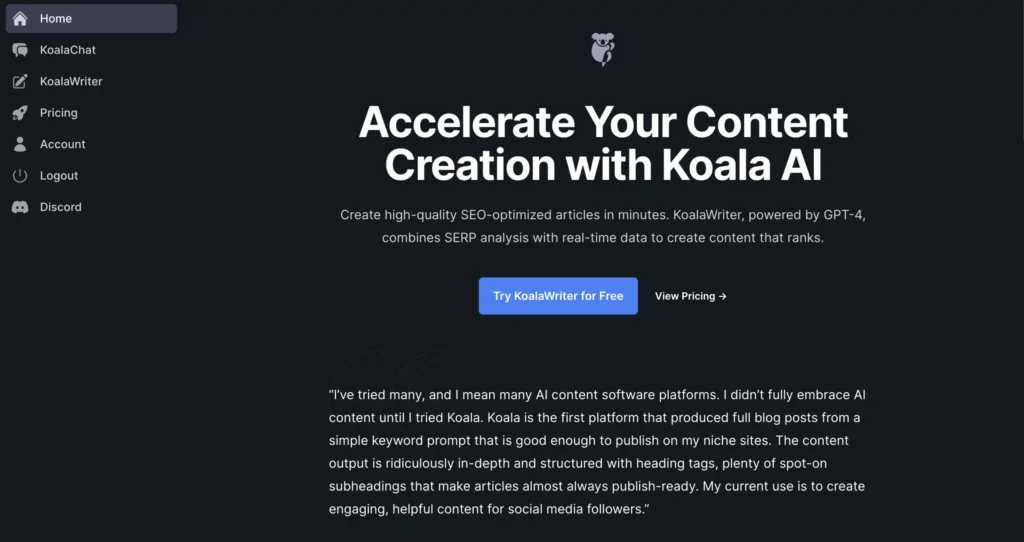
Koala AI is a super handy AI tool for marketing needs that helps you create long-form content like blog posts and automatically optimizes them for better results. It makes the process a lot easier.

Before you generate an article, you can adjust a bunch of settings to make sure the content fits your needs.

Here’s what you can tweak with Koala AI:

  • Outline (this one’s my favorite)
  • Tone of voice
  • Article length
  • Language (it supports 97 languages!)

You can also set a target keyword for Koala AI to include in the content. Plus, you can ask it to add an FAQ section and even pull in real-time data.

As a content creator and website owner, I mainly use Koala AI for blog posts. But it’s great for creating other types of content too, like social media posts, images, and Amazon affiliate posts.

I’ve shared my full experience using Koala AI, including some examples of posts I’ve created, in my Koala AI review.

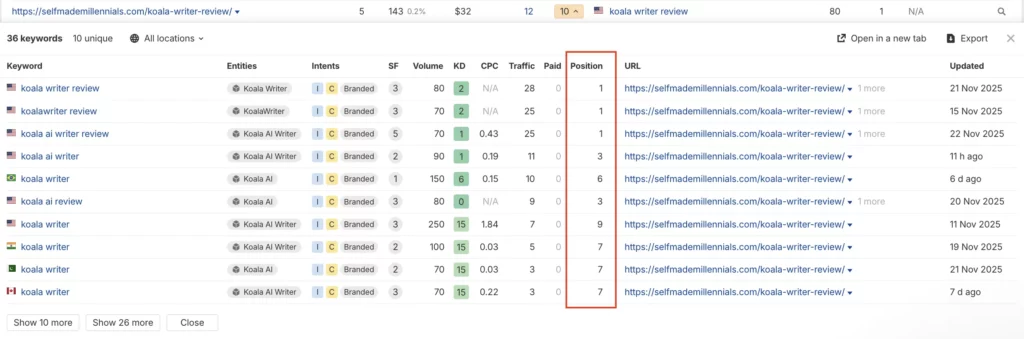
In fact, that blog post review itself was created with Koala AI, and I added a few unique paragraphs to make it more helpful. It’s one of my top-performing articles, according to Ahrefs.

Koala Review post performance Dec 2025
Koala Writer AI is among my top performing posts, according to Ahrefs.
Apply this discount code to get 15% off on all Koala AI payment plans: COUPON15

7. Indexly

  • Best for: Technical SEO specialists, website owners willing to track website issues and get their content indexed faster.
  • Best feature: Bulk Indexing, Inspect Pages, Keyword Rank Tracker.
  • Pricing: Starts at $14 monthly for 3 websites, there’s also a 14-day free trial.
Indexly Decemvber 2025

Indexly is an AI-powered toolkit for marketers that started as a solely technical SEO tool to speed up indexing.

However, Indexly is much more than just an indexing tool nowadays. 

Today, it’s an all-in-one marketing tool that you can use to do the following:

  • Track the indexing status of all website pages in one place
  • Submit multiple pages for indexing in bulk
  • Inspect every page individually 
  • Track keyword rankings 
  • Set up alerts for tracking keyword position changes
  • Monitor if backlinks to your website are live
  • Check and track website inbound links and analyze how they impact rankings
  • Analyze the performance of your website 

For me, I use Indexly to keep track of my website’s indexability and quickly submit new pages for indexing.

One of the coolest features is auto-indexing. It tracks the status of all your pages in one place and automatically submits new ones for indexing, so you don’t have to worry about missing anything — it’s super convenient!

Think of it like a VIP lane for search engines to find, index, and rank your pages much faster than they normally would.

I think Indexly is a game changer, especially for new websites that can take weeks to get indexed (like mine did). It’s also great for e-commerce sites with tons of product pages that might get overlooked by crawlers.

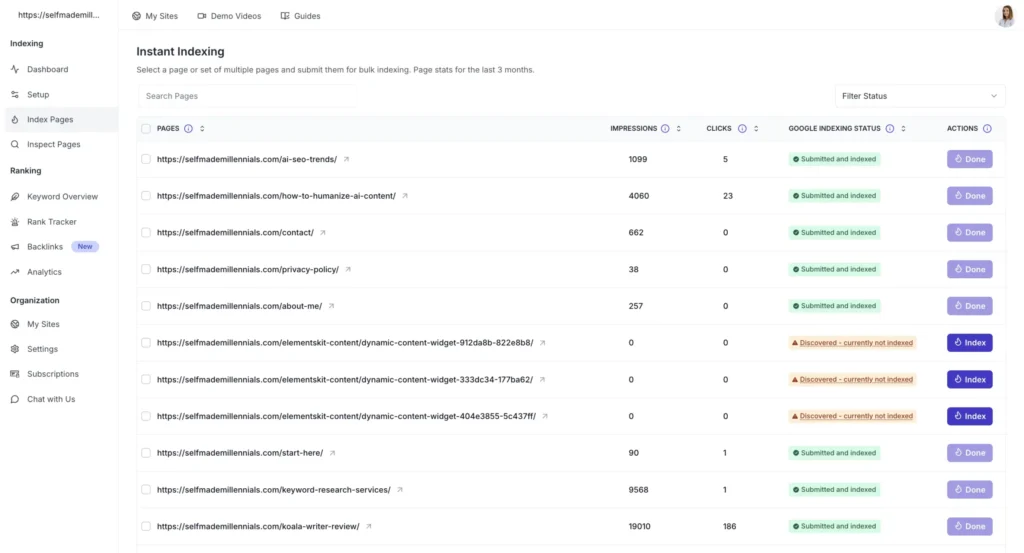
For instance, with the Instant Indexing report, I can spot any problem pages and hit “Bulk Index” to submit them for indexing right away if I think they should rank on Google.

It’s been such a time-saver!

Instant Indexing Instantly
Indexly Instant Indexing feature.

If you’re not keeping an eye on whether your website pages are getting indexed, it’s time to start. Trust me, you don’t want to miss out on your site’s full potential!

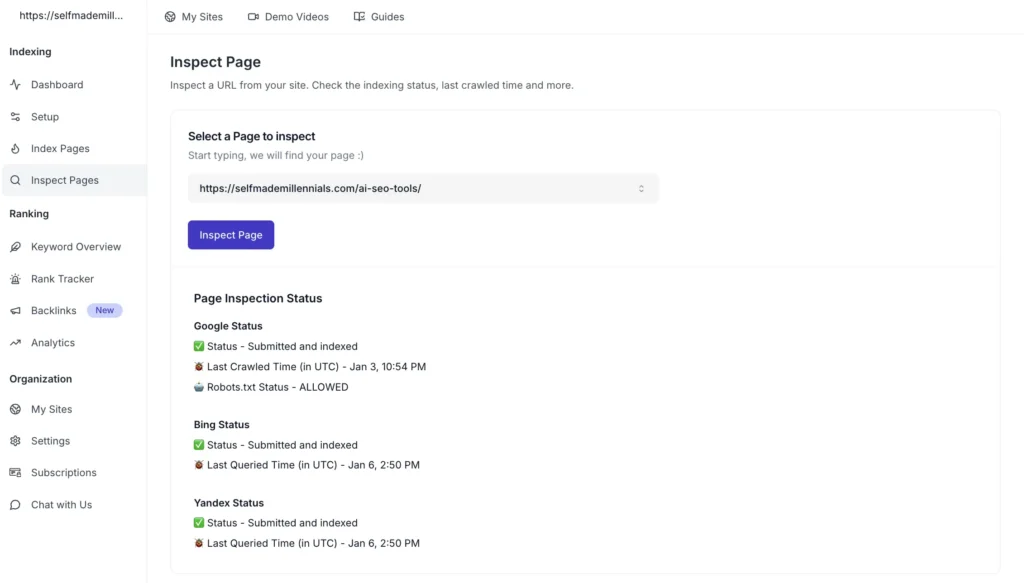
Here’s a quick SEO tip to help your site grow faster: After you publish a new page, inspect its URL right away. This lets you check if the page is:

  • Discovered
  • Crawled
  • Rendered
  • Indexed

You can do this with Google Search Console, but I like having everything in one spot.

That’s why I use Indexly’s Inspect Page tool to monitor all my new pages (see below).

The sooner you start tracking indexing, the fewer technical issues you’ll face, and the more pages you’ll get ranking and driving organic traffic!

Indexly Inspect Tool
Indexly Inspect Page feature.
First-time users can get 25% off any Indexly plan by using the discount code INDEXLYCOUPON at checkout.

8. Keywordly AI platform

  • Best for: Content creators, marketing specialists, and content writers.
  • Best feature: Keyword clusters creation, Keyword research on Google, Reddit, Amazon, Quora, and AI-powered content creation.
  • Pricing: Starts at $49 per month. Lifetime deal for $299.
Keywordly AI SEO Tool December 2025

Keywordly AI is an AI-powered tool for marketing that helps automate your content creation process. It helps you find keywords on platforms like Google, Reddit, Quora, and Amazon. It can also group similar keywords into content clusters.

Here’s what you can use it for:

  • Find and analyze keywords for Google and Bing ads
  • Research related and long-tail keywords
  • Find relevant conversations on Reddit and Quora 
  • Spot keyword gaps between you and your competitors
  • Find product recommendations for Amazon
  • Get tons of ideas from just one seed keyword (kind of like Semrush’s Keyword Magic tool)

Pretty useful, right?

Personally, I’m a fan of the Reddit keyword tool. It saves time by pulling up relevant threads and subreddits. 

If you’re into Reddit marketing, it’s worth trying. (Remind me to share how I rank Reddit content sometimes, but for now, I will go back to keyword clustering.)

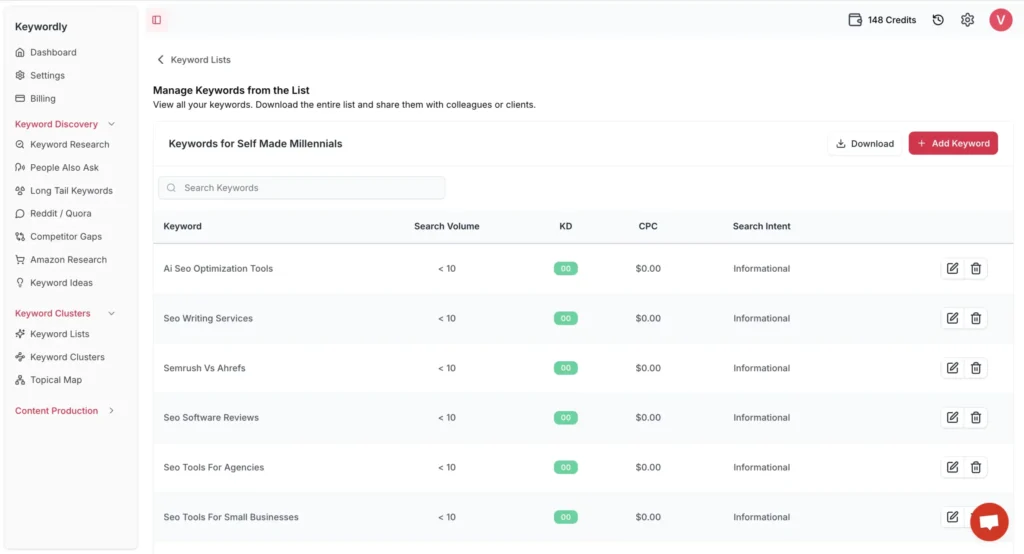
While you’re researching, you can save keywords to a list for later or add them one by one. It’s totally up to you.

Oh, and Keywordly can handle up to 500 keywords in one clustering session, which makes it suitable for mid-sized content projects.

how to create a keyword list with keywordly

Get 20% off your Keywordly subscription today! Use the code KEYWORDLY20 at checkout and start optimizing more efficiently for less.

Grammarly

  • Best for: Content writers, content creators, site owners, copywriters.
  • Best feature: Review suggestions, Write with generative AI.
  • Pricing: Starts at $30 monthly. There’s a free plan, which you can use to correct your spelling and grammar mistakes.
Grammarly AI marketing tool

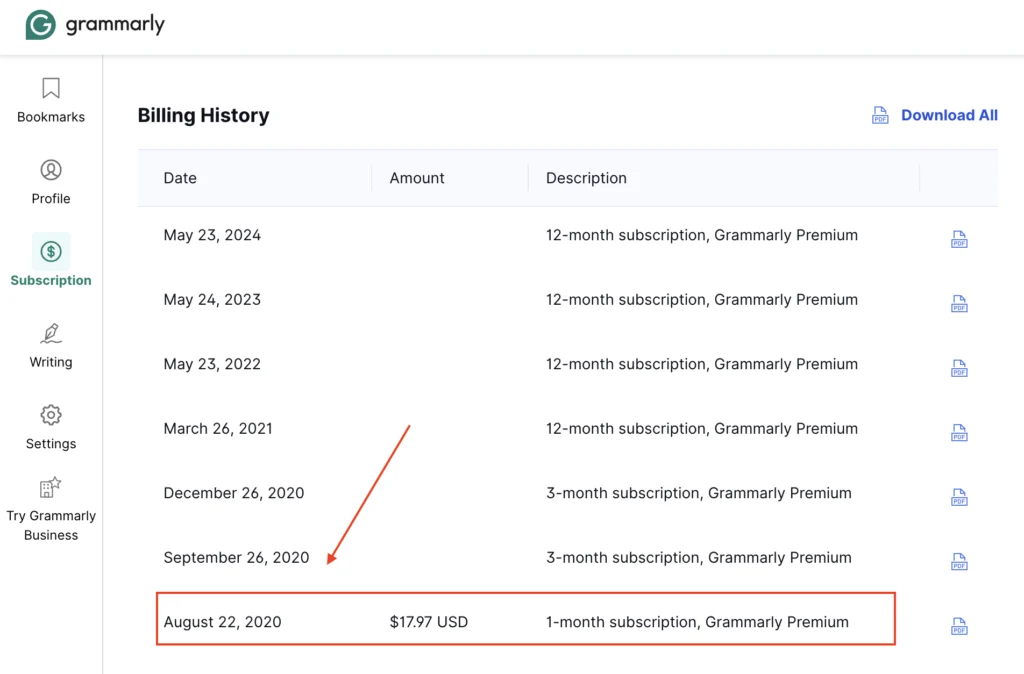
I’ve been using Grammarly since the early days of my marketing journey, long before the AI craze kicked off. My first subscription was in August 2020, and I’ve kept it ever since. 

It’s been quite a ride!

Using grammarly as an AI marketing tool

Grammarly has changed a lot, especially with the addition of AI marketing tools.

It used to be primarily a tool for content editors, but nowadays, it’s a powerful AI writing assistant for everyone consistently working with content.

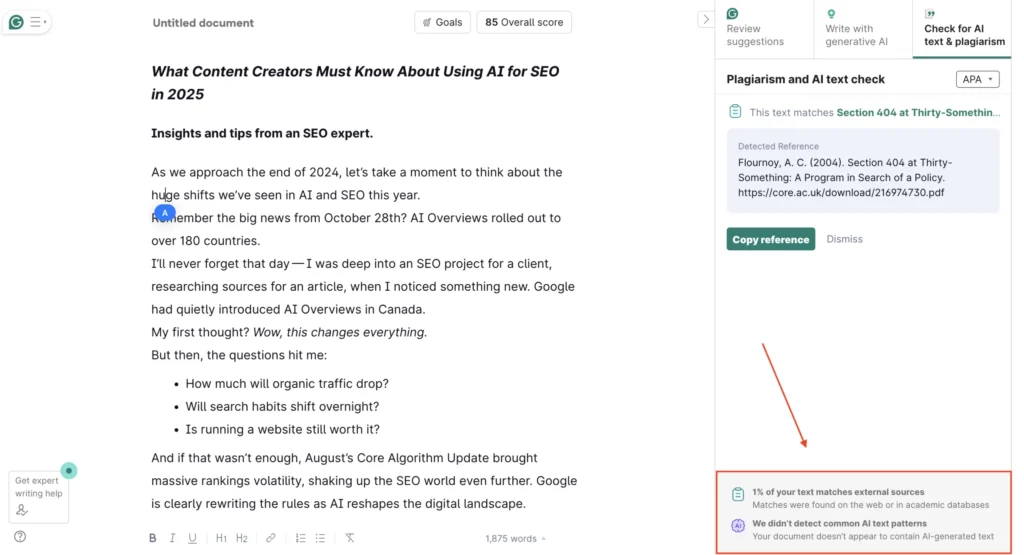
I keep using Grammarly even though ChatGPT can proofread, mainly because it’s integrated into so many of my work tools. It allows me to improve my content on the go. Plus, I use the Grammarly browser extension to check if my content or anything else matches external sources or AI-generated material.

It’s not perfect, though. You can bypass its algorithm by rephrasing content, but it gives me a good sense of readability and uniqueness. Since I deal with a ton of content every day, this level of detail is usually enough to make quick decisions.

Grammarly web browser extension

Recently, I heard some exciting news from Grammarly. On December 17th 2024, Grammarly announced that it’s in the process of acquiring Coda, an all-in-one collaborative workspace, to help its users supercharge their productivity.

Grammarly and Coda

10. ChatGPT

  • Best for: Content creators, marketing specialists, and content writers who need a virtual assistant.
  • Best feature: ChatGPT doesn’t have extra features, but it really shines when it comes to analyzing search results and creating images.
  • Pricing: The personal plan is free to use, but the Plus version is $20 monthly.
chatgpt AI tool for seo

I’ve been using ChatGPT since it launched in November 2022, and I have to say, OpenAI has really improved it since then.

I remember when the AI-generated content was hard to read, robotic, and pretty much useless. But now, if you give it the right prompts, you can get some pretty good results.

These days, ChatGPT is a key part of my marketing toolkit. I use it to create, proofread, and refine my content.

Honestly, this article was also created using ChatGPT, just like many others on my website.

AI-generated content can rank if you follow Google’s E-E-A-T guidelines (Experience, Expertise, Authority, Trust).

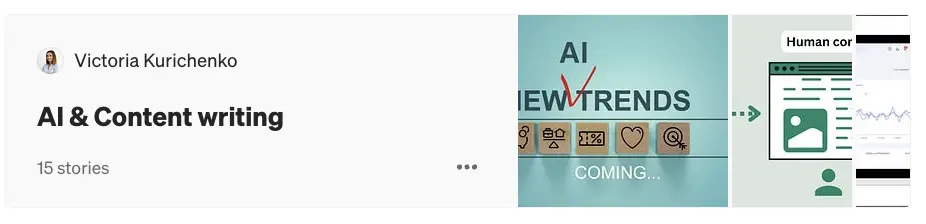
I’ve got a whole bunch of case studies from my experiments with ChatGPT and SEO. If you’re interested, you can dive deeper into my findings in one of my Medium libraries.

My AI and Content Medium library

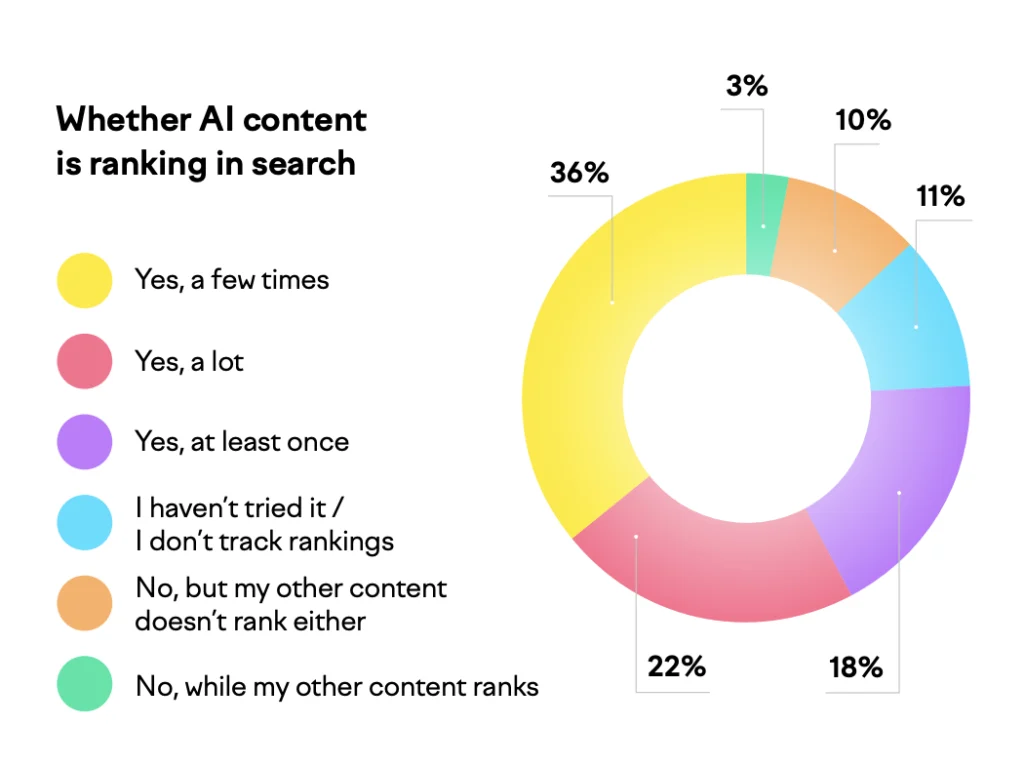
It’s not just me who’s noticed this—over 2,600 marketing and business professionals from around the world shared similar findings in Semrush’s AI Content Marketing Survey.

Semrush study on ai content ranking in search
Semrush's survey results.

Now, a few more words about how I use ChatGPT as a content creator. Here are some tasks which it can do well based on my experience:

  • Paraphrase content, keeping your tone of voice
  • Make your content conversational
  • Write succinct definitions 
  • Create FAQ section and answers
  • Research sources for your content 

Personally, I often use ChatGPT to clean up my rough drafts while staying true to my tone. I’m pretty impressed by how well it mimics my style—sometimes, it’s hard to believe it’s not my own writing!

FAQ on AI for Marketing

I came across a few questions about this topic, so I thought I’d jump in and share my thoughts.

Feel free to let me know if my tips and the article were helpful in the comments!

It is basically software powered by artificial intelligence that helps you save time and speed up your marketing tasks.

From what I’ve seen, these tools can handle a variety of jobs, like analyzing data, creating blog posts, crafting social media updates, editing content, tweaking tone of voice, and so much more.

I’ve written about AI SEO tools before, where I shared my experiences and results. But AI marketing solutions cover a wider range of tasks and can be helpful for an entire marketing team — whether you’re in SEO, PPC, social media, video editing, or PR.

It’s worth mentioning that even the best AI tools aren’t capable of doing your job as a content creator or a marketer well. They are not supposed to. 

After trying dozens of various solutions in 2024, I realized that the smartest (and safest for your website) way to use AI tools is as your personal assistant.

This approach lets you keep your creativity, which makes your marketing unique, while leveraging AI to work smarter and more efficiently.

There’s no one-size-fits-all answer to this because every business is different and has its own needs.

Since I’m running my online business solo and working on growing my website, here’s what works best for me in terms of paid and free AI tools:

1. Semrush

2. Koala Writer

3. beehiiv

4. ChatGPT

5. Grammarly

That’s my personal setup that helps me grow my business and income. If I discover new tools that help, I’ll definitely add them to this list.
But the best thing you can do for your own business is learn from other customer experiences and test out a few tools. The ones that really support your needs and goals are the ones that will work best for you!

From My Desk to Your Inbox

Join the newsletter for actionable SEO tips, case studies, and a behind-the-scenes look at my affiliate marketing journey.

No spam. Unsubscribe anytime.