Semrush Review (2025): SEO Expert Analyzes Its Accuracy
Written by
Victoria Kurichenko
Updated December 25, 2025
As an SEO specialist and content writer, I use Semrush’s SEO and Content toolkits to grow my own site and help clients create content that ranks.
I typically use several SEO tools simultaneously, but I always return to Semrush Pro for client work, and I also use the free version to track the performance of my site.
After spending a lot of time with Semrush and really getting to know what it can (and can’t) do, I thought I’d share some honest insights you won’t usually find in typical blog posts. Especially now that Semrush rolled out a fresh design and updated its toolkits in June 2025. These days, it’s more like a bundle of different marketing tools all packed into one platform (I’ll break it down more in the post).
I’ll show you how it compares to other popular SEO tools and what makes it stand out.
If you found this post through Google while searching for a Semrush review, you’re in the right place. I’ve moved all the beginner-level stuff, like “What is Semrush?” to the FAQ section at the bottom.
In the article, I’ll dive right in by looking at how Semrush compares to tools like Google Search Console and others I’ve tested, so you can see how accurate it really is.
Before I get into the details, let me quickly update you on what has changed in Semrush’s UI and functionality since June 2025.
P.S. Some links are affiliate in this post. This means I’ll earn a small commission if you decide to go for Semrush. I’m sharing this because you deserve to know this info. Even if you don’t go for it, I’m happy to support Semrush, as I’ve been using it myself for years.
Semrush’s new design and toolkits
I’ve been using Semrush Pro since 2019, and at the time, it was a go-to all-in-one marketing tool for online marketing teams.
I used it mainly for search engine optimization, while others on the team handled social media, competitive analysis, backlink analysis, and marketing campaigns, all within the same platform. It had something for everyone.
But things have changed since then…
Today, Semrush looks and feels quite different.
Nowadays, it is an AI-powered marketing tool with 55 different Semrush features for various marketing tasks.
Everything’s neatly organized into seven toolkits, so you can easily find what you need based on what you work on.
Here’s a quick overview of each Semrush toolkit:
SEO Toolkit: This one combines all SEO-related features for keyword research, domain analysis, link building, and site auditing to help you create an SEO strategy and boost organic search rankings.
Content Toolkit (former ContentShake AI): This toolkit can help you optimize your content production process, from content brief generation to content creation and optimization.
AI Visibility Toolkit: This new toolkit helps you track your brand’s performance in AI search results
Social Media Kit: It helps with social media management across different platforms.
Advertising Toolkit: You can use this toolkit to research, plan, launch, and optimize online ad campaigns.
Local Business Kit: This one will help you manage your Google Business Profile and online reviews.
Traffic and Market: This one will help you with competitive intelligence to find what works for your competitors and how they grow.
Semrush One puts two toolkits (SEO Toolkit + AI Visibility Toolkit) into one plan. It can help you track and grow your brand’s visibility across Google, ChatGPT, Perplexity, Gemini, and other platforms where people discover content today.
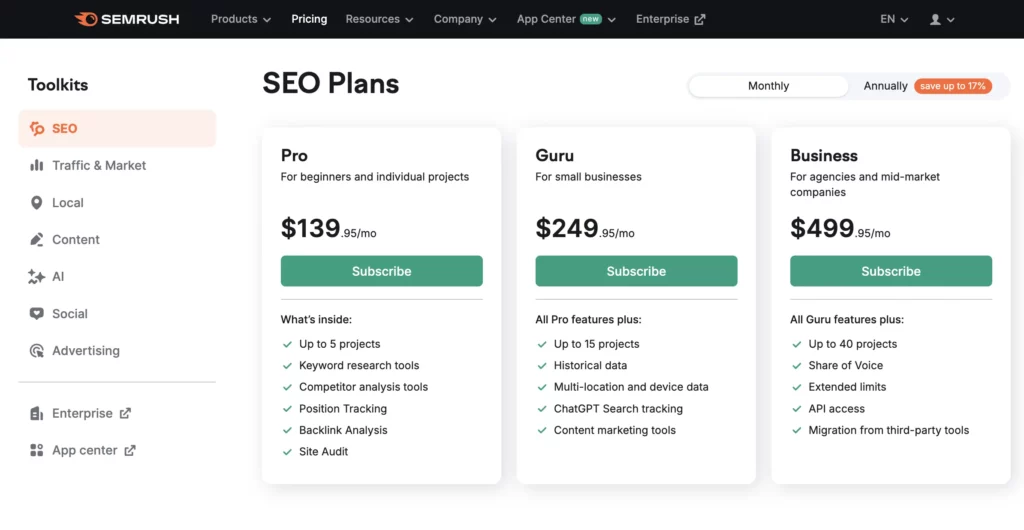
The old Semrush pricing and the conventional pricing plans, Semrush Pro and Semrush Guru plan, are now applicable to the SEO Toolkit only!
You’ll have to upgrade to at least the Semrush Pro plan to use the SEO Toolkit. The Semrush Pro plan costs $139.95 monthly, while Semrush One, which combines SEO + AI Visibility toolkits, costs $199/month.
It’s also worth mentioning that Semrush’s customer support issues refunds within one day if your card was accidentally charged, as it happened to me once. You’ll only need to fill out the contact form to request a refund. The Semrush support team will respond to you via email to confirm the refund.
Before choosing any paid plan, I recommend signing up for the free trial. This way, you’ll test the software and decide whether it works for you.
You don’t have to pay for the SEO toolkit if it’s not something you need. Instead, you can choose a different toolkit that fits your goals and just upgrade to that plan.
So, go with the one that makes the most sense for your marketing needs.
How accurate is Semrush’s data?
Now, let me dive deeper into the Semrush SEO toolkit and discuss the data accuracy. That’s the biggest challenge for marketing professionals and SEOs when selecting an SEO tool.
Can we trust the data enough to make data-driven decisions? That’s the real question.
Personally, I only trust a tool after running tests and comparing its numbers with reliable sources like Google Search Console and Google Analytics. That’s the best way to see if it actually delivers.
If you’re wondering whether Semrush provides accurate data, I’ve got you covered.
Just a heads-up: I’m only comparing the important metrics, like organic traffic. Data from other channels isn’t part of this comparison.
Here’s a quick look at my website’s SEO metrics from October 2025:
Category
Semrush
Ahrefs
SE Ranking
Google Search Console
Organic traffic
15,100
47,400
3,300
8,000
Top 3 pages based on organic traffic
AI SEO tools
Ahrefs alternatives
AI marketing tools
AI SEO tools
Ahrefs alternatives
AI Marketing tools
AI SEO tools
AI Marketing tools
Ahrefs alternatives
AI SEO tools
AI marketing tools
Ahrefs alternatives
Organic traffic estimate for the top-ranking page
6,000
15,237
1,150
3,570
Number of keywords
3,800
3,350
7,400
Referring domains
604
453
612
Number of backlinks
2,000
1,300
2,000
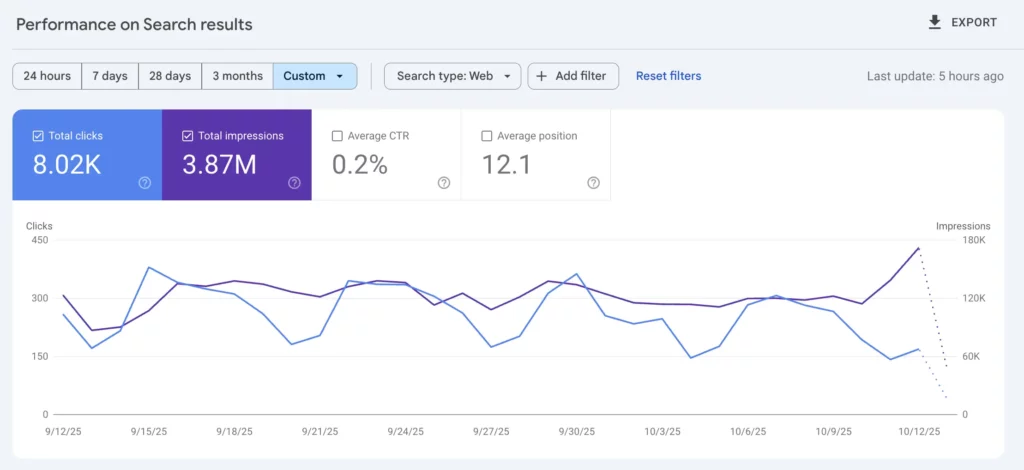
Here’s a screenshot from my Google Search Console showing my organic website traffic from October 2025. It estimates a total of 8,000 clicks.
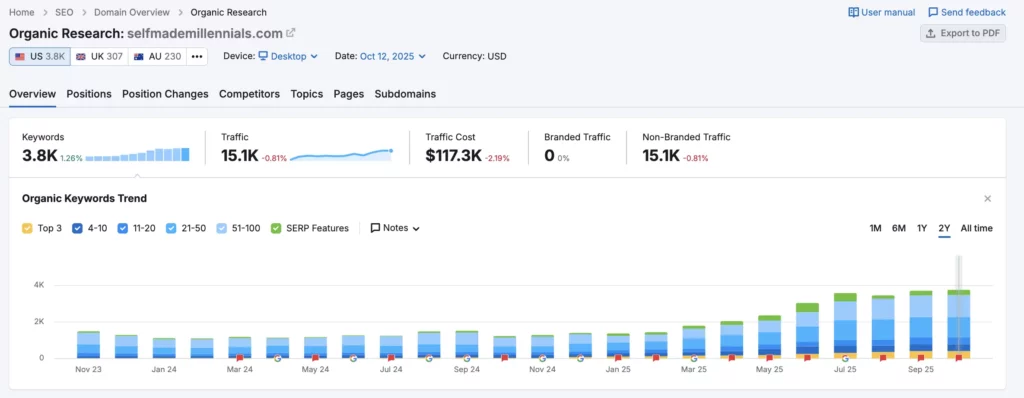
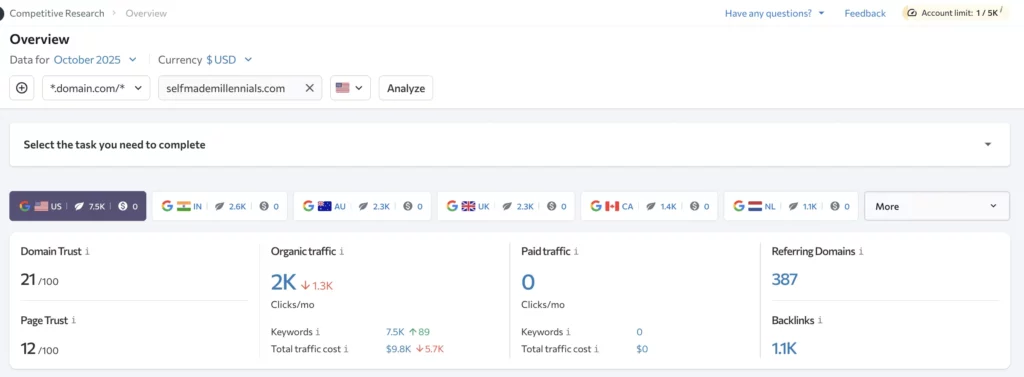
And here’s what Semrush says about my site for the same period. Its organic traffic trend is 15,100 monthly visits. That’s a bit over my actual data from GSC.
So, if you rely on this metric to assess your competitors’ performance, just remember that this is just an estimate.
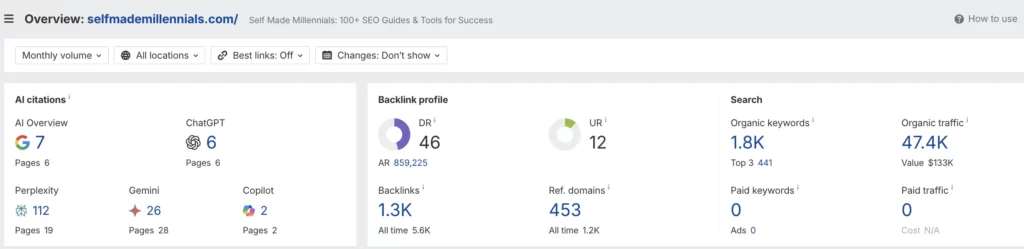
Let me show you Ahrefs’ estimate. I used to rely on this tool for many SEO tasks, but lately, I’ve noticed its organic traffic and keyword estimates aren’t always accurate.
According to Ahrefs, my site got around 47,400 views in October 2025. But that’s way off. My total traffic from all sources was just over 17,000 according to Google Analytics, and my actual organic traffic was only 8,000.
Take a look at my detailed comparison of Semrush vs. Ahrefs if you are interested to learn which one is worth using.
This means Ahrefs overestimated my organic traffic compared to GSC!
Alright, let’s chat about SE Ranking.
It’s another tool you can use instead of Semrush, and it comes with some useful features. I’ve been testing out their Pro plan for the past 6 months to see how it stacks up against Semrush and Ahrefs. I haven’t written a full review yet, but it’s on the way.
For now, here’s one quick takeaway: SE Ranking shows my site got 2,200 organic visits in July 2025. That number’s way lower than what Ahrefs and Semrush report. So, it’s definitely something to keep in mind.
I focused on organic traffic estimates because that’s what really matters to SEOs. This is a key SEO metric they track.
Among all the big players in the industry, Semrush stands out when it comes to traffic estimates.
And that’s no accident.
Semrush’s set of data includes over 808 million domains, 27.2 billion keywords, click stream panel data from billions of events per week, over 43 trillion backlinks, over 10 billion URLs crawled per day on average, and a range of data aggregated from social media networks. That’s impressive numbers that not every SEO tool can offer.
At this point, Semrush is one of the best SEO tools out there, offering more backlink and keyword data than any other tool.
None of the SEO tools gave me spot-on data about my top blog post’s performance, but Semrush came close enough.
That means you can probably rely on Semrush when checking your competitors’ top-performing pages. The numbers won’t be 100% accurate, but they’ll still show clear trends—whether a page or domain is growing or losing traction.
I hope you found these comparisons helpful!
If there’s anything else you’d like me to test for this Semrush review, drop your suggestions in the comments. I’ll run the experiment and update the post.
What you can do with Semrush’s SEO toolkit
Let’s dive into what Semrush can actually do and why I keep coming back to it.
I’ll walk you through some of its standout features, like the Keyword Magic Tool, it is a total game-changer and saves so much time.
Here’s a quick look at what Semrush offers, and then I’ll break it down in more detail:
Get an overview of a domain’s online presence
Track a domain’s growth over time
Find out which topics and keywords are driving organic and paid search traffic
Compare up to five competitor domains in one report
See key metrics like organic and paid search traffic, and backlinks, for specific countries or globally
Track a domain’s progress for organic and paid traffic, and backlinks over any period (3 months, 6 months, 1 year, etc.)
Check out competitors’ top-performing pages based on traffic and keywords
See how much organic traffic a search term is sending to your competitors
Discover and analyze competitor traffic sources
Spot keywords and URLs gaining or losing traffic
Get updates about competitors’ activities, like when they publish new content
Run an SEO audit to find technical issues
Get daily or weekly email updates on major changes so you can stay ahead
Monitor your site’s rankings and your competitors’ daily
Get suggestions for improving every page on your site
Generate optimized content in different languages with Semrush’s Content Toolkit
Manage local listings with Semrush Local
And more!
This is already a long list, and I’ve only covered the SEO features.
But Semrush is an all-in-one SEO toolkit that can be used by an entire online marketing team.
Beyond SEO, it also helps with social media campaigns, paid search ads, influencer marketing, outreach, market research, and much more.
While I was updating this Semrush review, I looked into how many features Semrush has.
While I was updating this Semrush review, I looked into how many features Semrush has.
Want to take a guess?
Semrush offers 55 different features for all sorts of online marketing tasks. So, whatever you need, there’s probably a Semrush report or feature for it.
Since I mostly work with SEO and content writing, let me share some SEO tasks that Semrush can help you do.
1. Check and analyze any website
With the Semrush free plan or Semrush Pro, you get access to the Domain Overview Tool, which helps you quickly check out any website.
Here’s how it can be useful for you:
See how your website’s current performance
Track your website’s organic traffic and keyword trends (if they go up or down)
Check out any website’s domain authority
Figure out if a website is good for link building
See if a website is growing or losing momentum
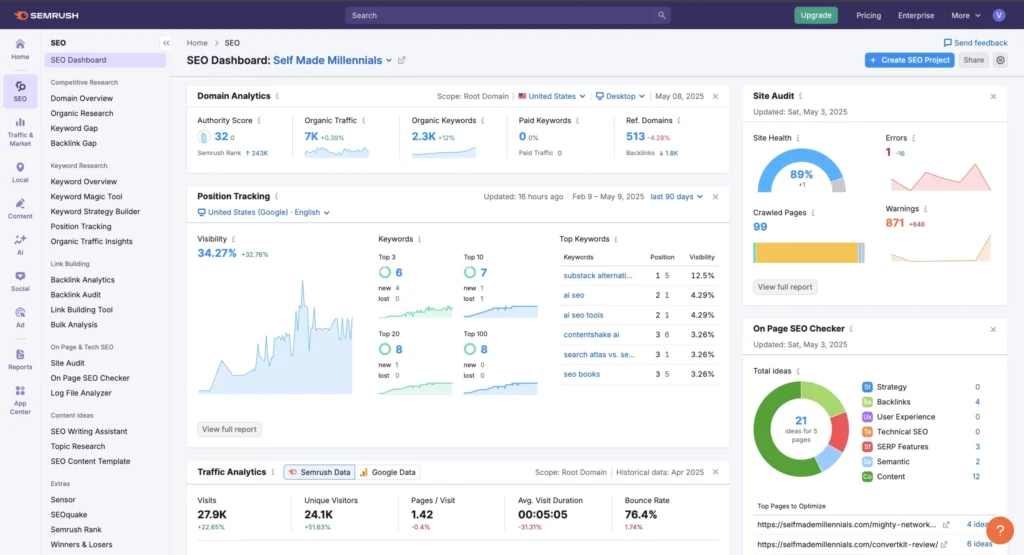
Most SEO tools have a similar report, but with fewer metrics included. What I like about Semrush is that it includes all essential information in one report to quickly assess any website’s current state.
SEO experts will find this report really helpful, but if you’re just starting out, it might feel a bit overwhelming with too much information.
The Semrush Domain Overview report.
2. Find keyword ideas based on your seed keyword
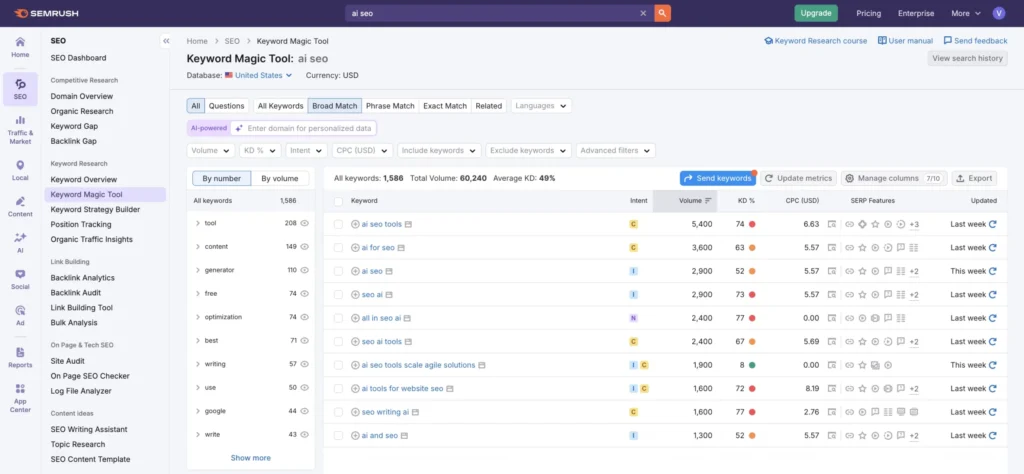
Unlike many other SEO tools, Semrush has a powerful Keyword Magic Tool that can help you find easy-to-rank keywords based on your seed keyword.
Considering that Semrush’s keyword database has over 26.4 billion keywords, I’m sure you’ll find keyword ideas for your website.
I recommend using Semrush when you:
Want to find keyword ideas related to your niche
Want to launch a new website and need to understand a niche potential
Specifically looking for easy-to-rank keywords with business potential
Here is how you can use Semrush Keyword Magic Tools step-by-step.
1. Open Keyword Magic Tool and insert your seed keyword (my seed keyword is “SEO” in the example below).
2. Indicate your filtering parameters only to see relevant keywords, such as the following:
Volume: 100+
Keyword Difficulty: Easy
Search Intent: Commercial
This way, you’ll quickly narrow down the search to relevant and easy-to-rank keywords for your website.
3. Review and select relevant keywords.
In my case, I’ve got 738 keywords after applying the filters. I’ve manually reviewed all keywords and picked 10 juicy keywords for my website. In fact, there were more suitable keywords, but I’ve already targeted most of them.
Semrush Keyword Magic Tool.
3. Check competitors’ top-performing pages
Whenever I need fresh keyword ideas for my website, I take a peek at my competitors’ top-performing pages. If something’s working for them, why not borrow a few smart strategies?
I’ve been doing this since 2015, and trust me, it works!
If you’re stuck on keyword research or your competitors keep outranking you, find out what works for them. It’s super simple with Semrush!
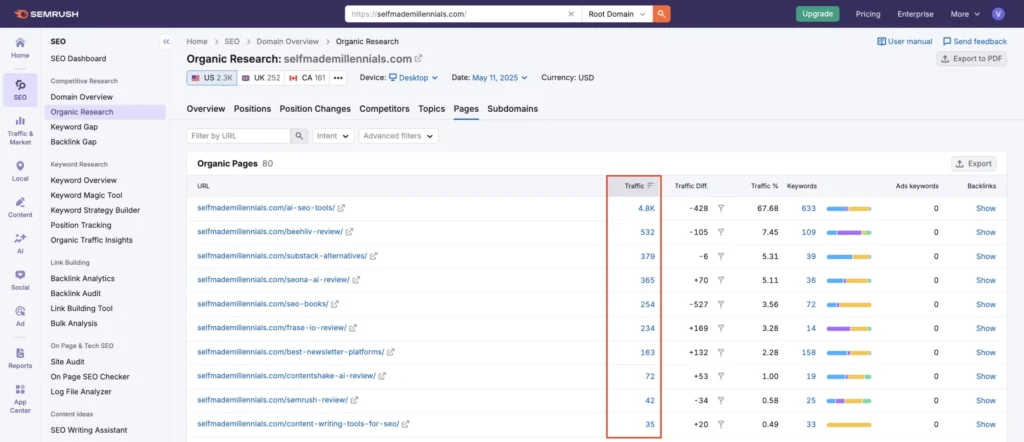
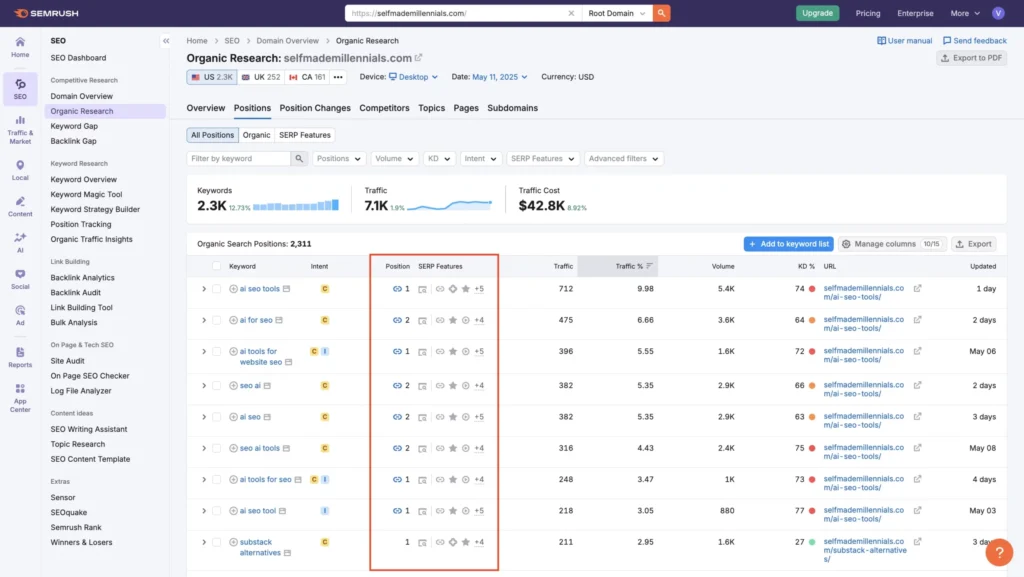
Just head over to the Organic Research report, go to Pages, and filter by traffic. Boom—you’ve got a list of their best-performing pages.
Check out the screenshot below. These are my website’s top pages, according to Semrush.
In my case, software review posts perform the best. That’s part of my affiliate strategy. Most of them rank in the top 10 and bring in sales.
The Semrush Organic Research report.
4. Check competitors’ top-performing keywords
Just like in the example, you can use the Organic Research report to find out which keywords bring the most traffic to your competitors.
Go to Organic Research > Positions, and you’ll see their top keywords, along with search intent and featured snippets.
How to check your website’s rankings in Semrush.
5. Find keywords your competitors rank, but you don’t
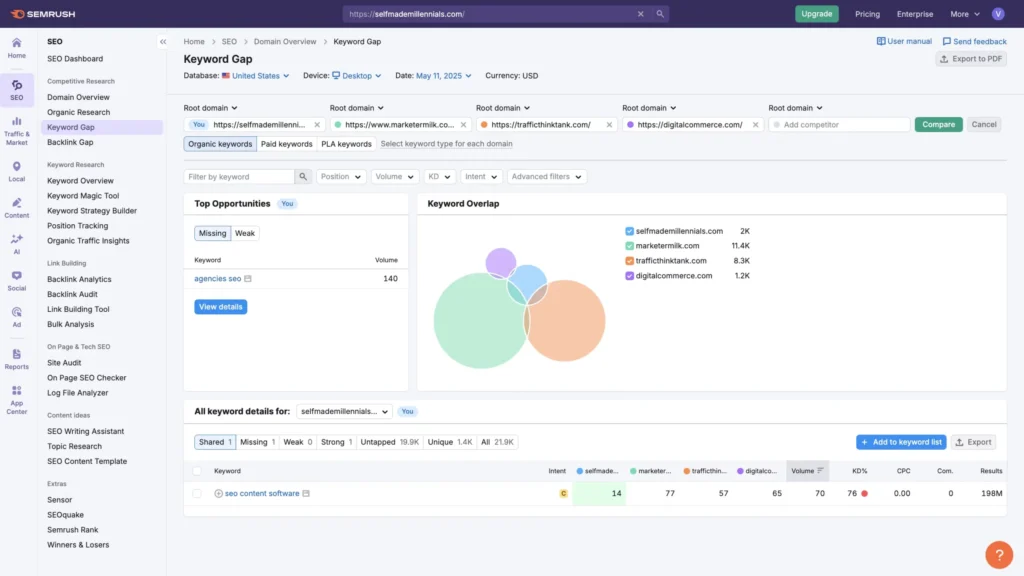
With Semrush’s Keyword Gap tool, you can see which keywords your competitors rank for, but you don’t.
Here’s how to do it:
Open the Keyword Gap report.
Add up to five competitor URLs.
Click Compare and select Untapped.
If you use direct competitors’ URLs, you’ll get a solid list of keyword ideas.
I tried this myself and found 8.9k keywords, which is way too many to go through manually. Since there’s no filter in this report, you’ll have to sort through them yourself.
Want to narrow it down?
Try adding just one competitor’s URL instead of five.
My Semrush SEO tool review — Semrush Keyword Gap report.
There is one more way of using Semrush effectively.
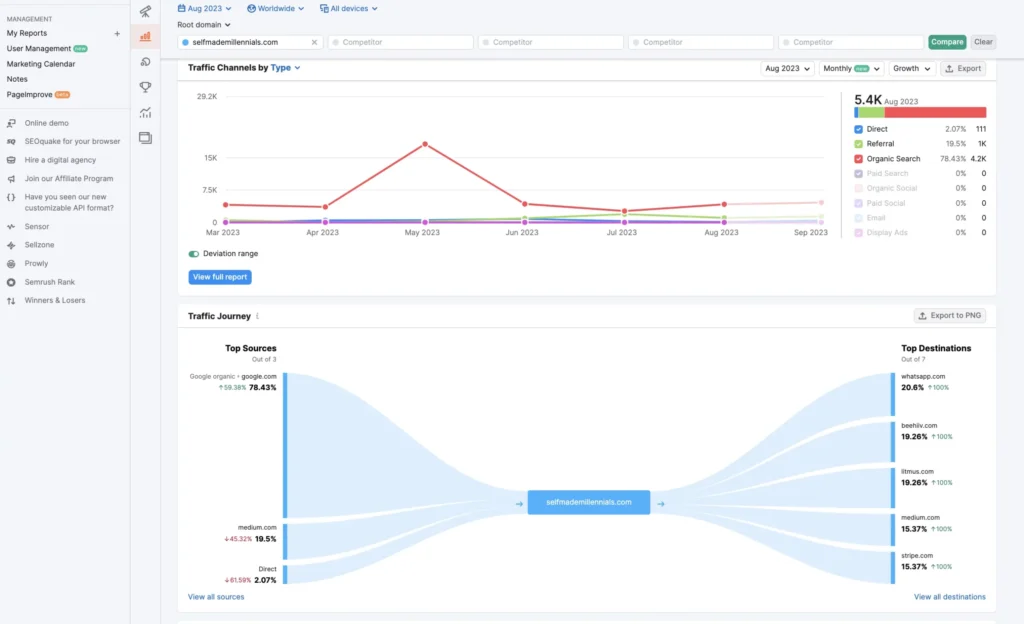
The Traffic Overview report provides an in-depth overview of competitors’ top traffic generation channels, including the top sources!
In the example below, Semrush got my top traffic generation channel right — it’s organic search. The second top-performing channel is referral because I am an active Medium writer with over 21k subscribers.
I believe the Top Sources is one of the most valuable reports here, giving you answers to what websites send traffic to your competitors and whether you can replicate their strategy.
Traffic sources analysis in Semrush.
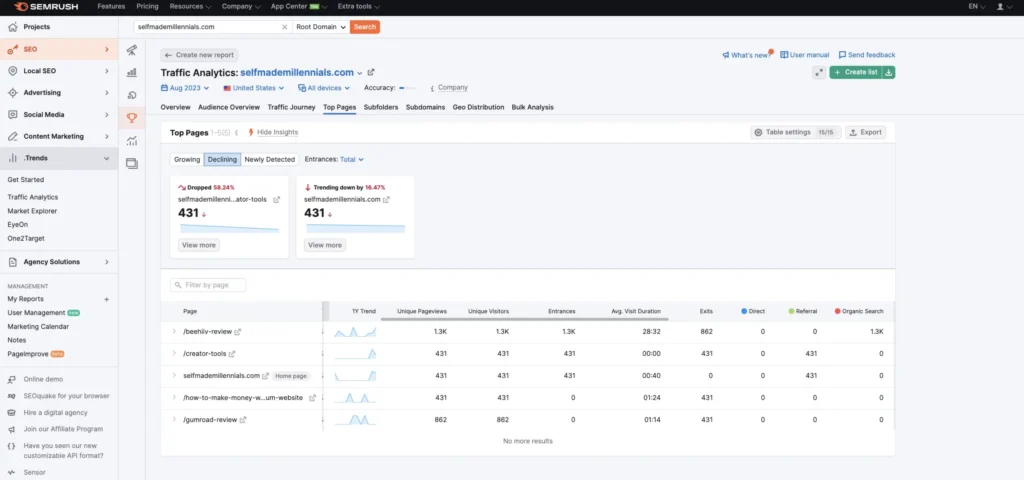
If you use Semrush Pro, you’ll only get a peek at the top three traffic sources. To see the full report, you’ll need to upgrade to Semrush Trends.
Semrush Trends gives you a quick snapshot of the market and competitor insights, helping businesses spot trends and find new growth opportunities.
Funny story, while writing this Semrush review, I accidentally bought Semrush Trends by clicking on a CTA inside my account. Since my credit card was already linked, the charge went through before I even realized it.
I wasn’t too worried, though. I had requested a refund from Semrush before, and they processed it within 24 hours. But after checking out the reports, I actually found them useful, so I decided to keep the subscription.
One of the reports I found interesting shows which pages are growing or losing traffic in a specific country. If these pages matter to your business, you might want to optimize them to keep their rankings steady.
Semrush Trends.
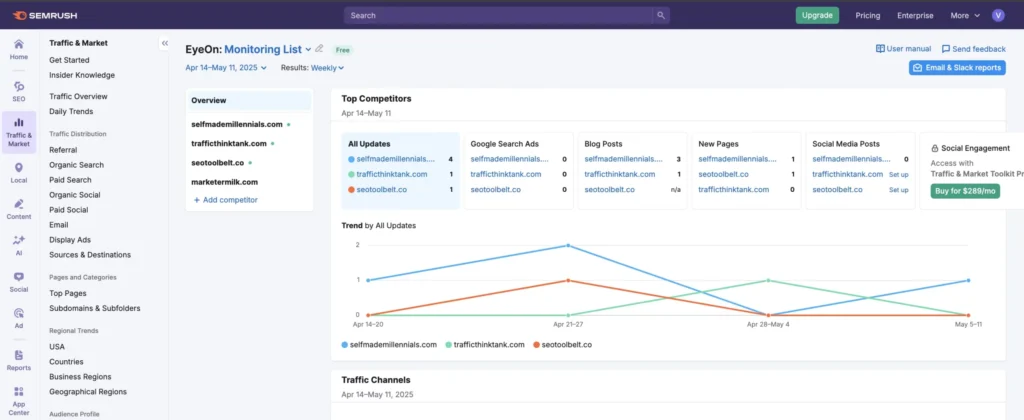
7. Monitor your competitors’ latest activity
Semrush has a cool feature I haven’t seen in other tools. It’s called Semrush EyeOn, and it keeps an eye on your competitors 24/7.
You’ll get instant alerts whenever they publish a new blog post, launch a web page, run search ads, or post on social media.
As an SEO expert, I find this super useful because it shows me exactly what my competitors are doing and how often.
Semrush EyeOn.
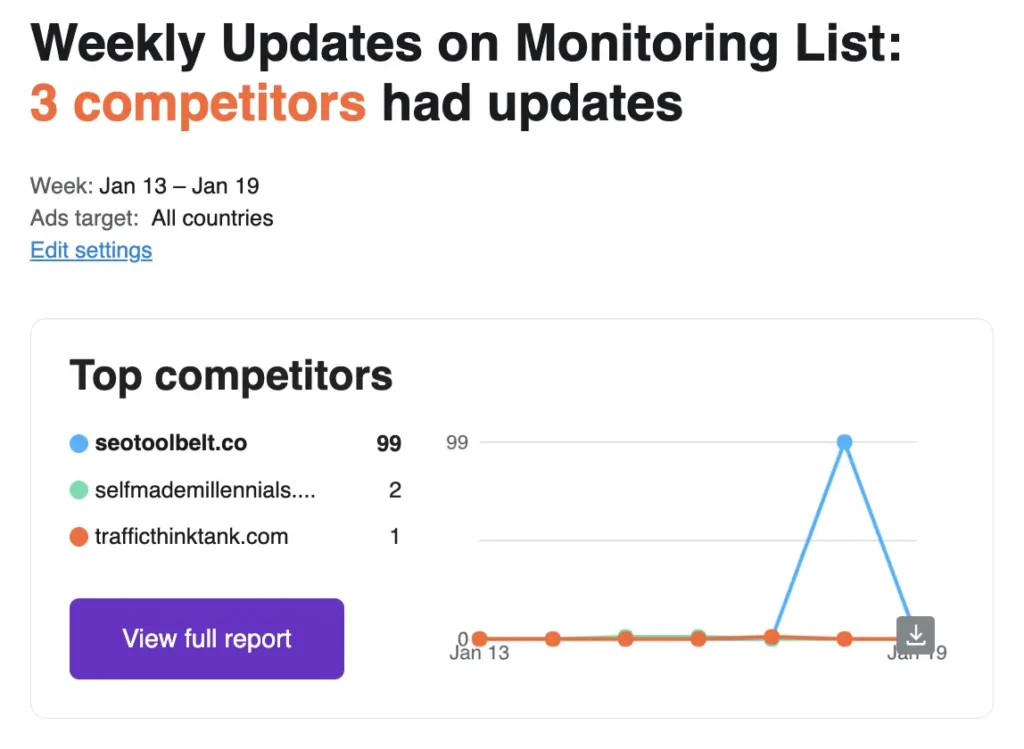
I’ve been keeping an eye on several websites using Semrush EyeOn. One time, I got a report saying a site had published 99 new pages in just a week.
Crazy, right?
Without Semrush, I would’ve never caught that!
8. Track your website rankings
Besides checking out your competitors, you can also use the Semrush SEO tool to keep an eye on your own website’s performance, especially your keyword rankings.
Here’s how to do it:
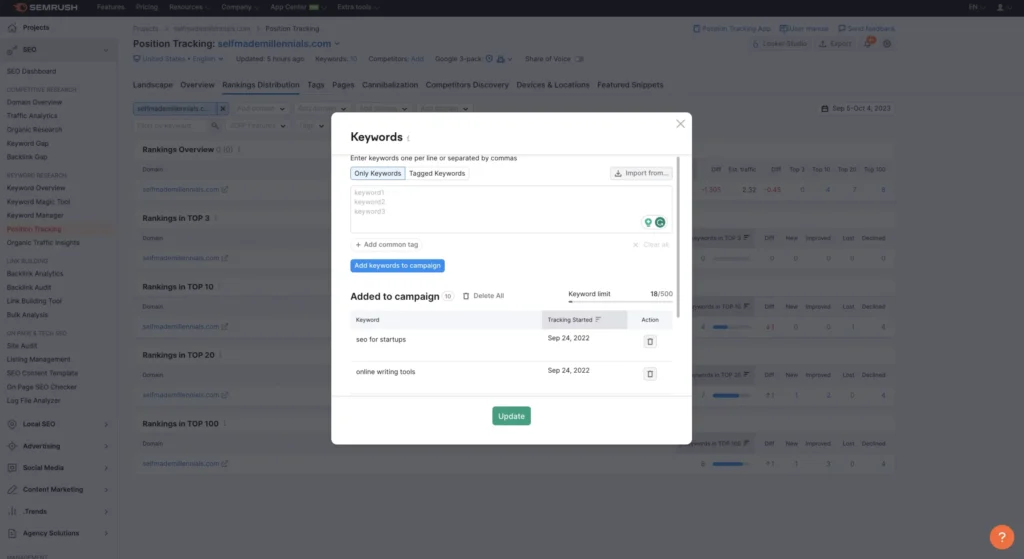
Go to Position Tracking
Select your website (or set up a new project)
Click on Rankings Distribution > Keywords
After following these steps, you’ll be able to add keywords for tracking. I suggest focusing on the most important ones for your business, like transactional keywords that bring in revenue. Keeping those rankings high should be a priority.
Once you’ve added your keywords, click Save (or Update if you’re making changes).
Semrush will then generate five reports:
Rankings Overview
Top 3
Top 10
Top 20
Top 100
I find these reports super useful.
Here’s how I use them:
I work to maintain rankings for keywords in the Top 3 and Top 10 reports.
I focus on improving rankings for keywords in the Top 20 report.
Plenty of SEO tools offer similar features, but I like how Semrush presents key data in a way that’s easy to understand.
How to track your keyword rankings in Semrush.
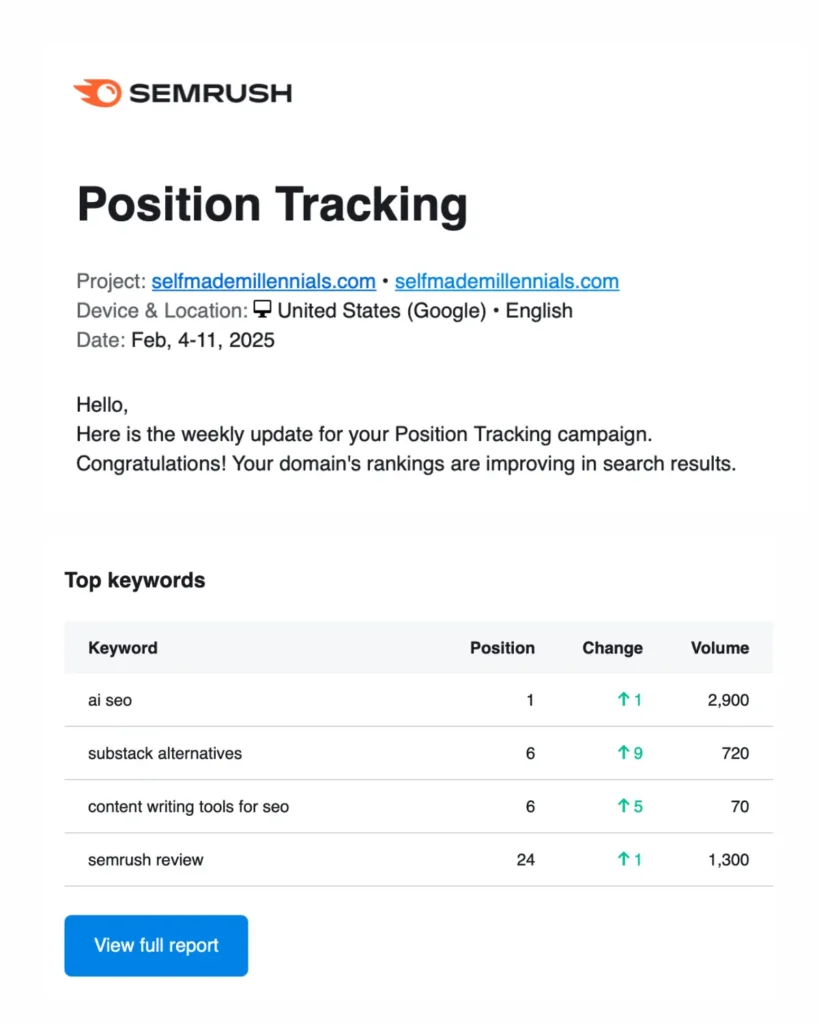
Shoutout to Semrush for keeping me on top of my website rankings with those handy weekly reports!
Since January 2025, I’ve been running my site like a real business—refining my content and sharing exclusive SEO insights.
And it’s paying off.
My AI SEO Tools page is crushing the rankings, even outranking some industry giants! It brought in 6,259 visits in January (per Google Analytics).
I’ve also revamped about 30% of my Content Writing Tools for SEO post. It’s still a work in progress, but the rankings are already climbing.
Plus, I dropped an updated Semrush review on Feb 7—no fluff like “What is Semrush?” Just straight-up insights and real comparisons with other SEO tools I actually use.
All these updates (and more) show up in the weekly ranking report Semrush sends straight to my inbox. Super convenient—I don’t have to track it manually, Semrush keeps me in the loop.
Semrush weekly position tracking report.
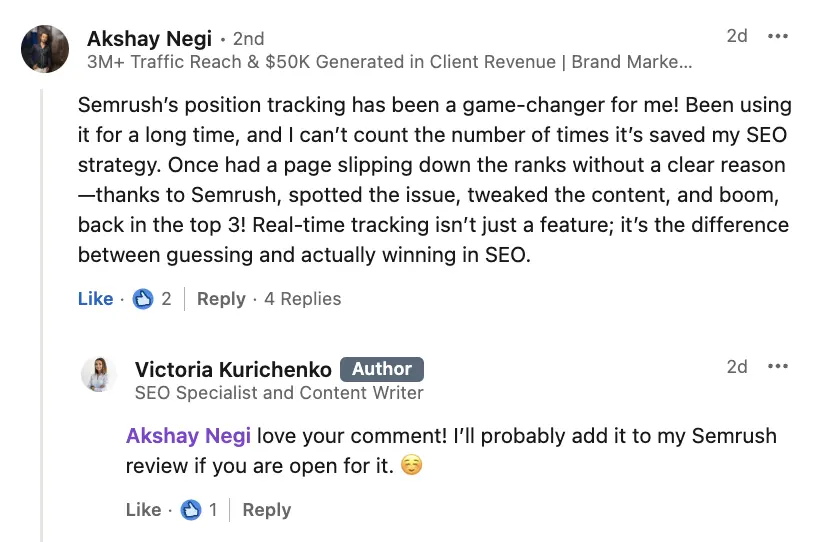
Here’s what Akshay Negi, a brand marketing expert, says about using Semrush’s Position Tracking tool to boost his online business:
An expert quote from Linkedin about Semrush's Position Tracking Tool.
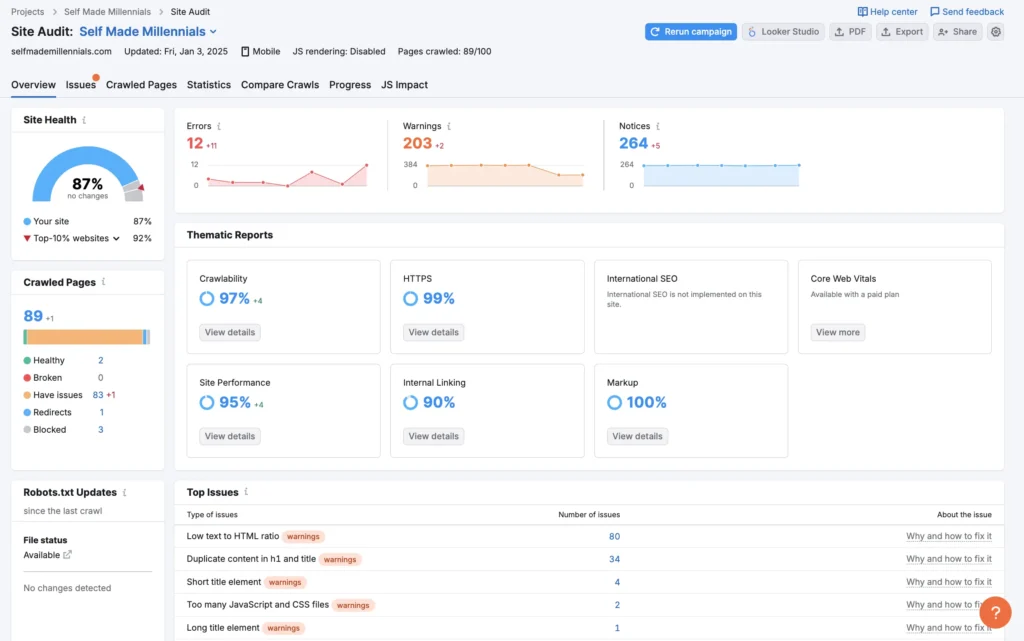
9. Track your website’s health
With Semrush Site Audit, you can check the current state of your website or your competitors.
I use this feature to track whether any technical issues occur on my website, such as the following:
404 errors
No-indexed pages
Wrong canonicals
Wrong redirects or redirect loops
Duplicate content
Broken internal and external links
And more.
Semrush Site Audit
It’s worth mentioning that many websites have technical errors and rank in the top positions on Google.
For example, my website has issues with the Core Web Vitals, a set of specific factors that Google considers important for user experience on a website.
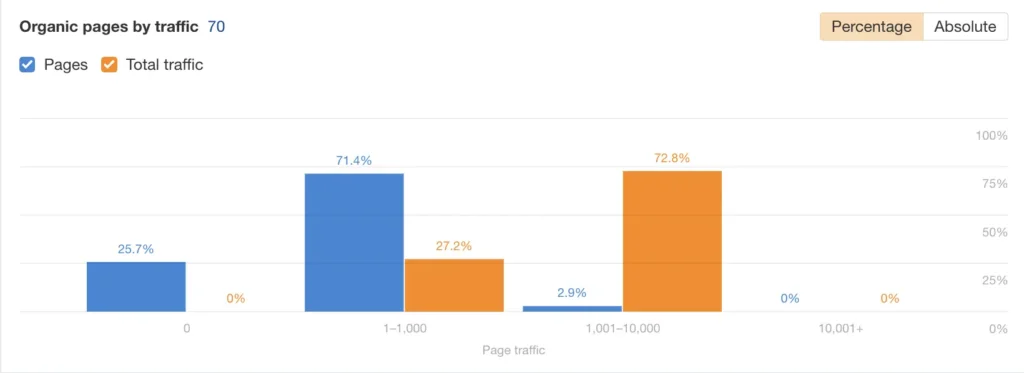
Nevertheless, 74.3% of all pages on my website generate organic search traffic.
The number of my website pages that generate organic traffic.
10. Get on-page SEO recommendations
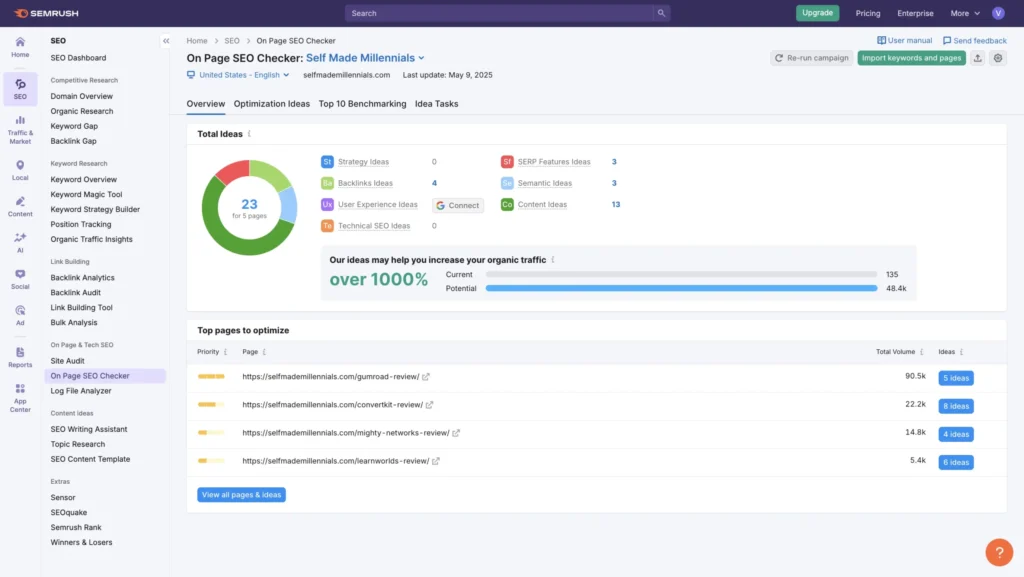
Semrush’s on-page SEO checker scans your web pages for technical issues and SEO mistakes that might hurt your rankings.
It points out areas where you can improve your content, page structure, and metadata to boost your chances of showing up higher in search results.
To get these recommendations, you’ll need to set up a project in Semrush and add your website.
When I tried it, Semrush gave me 33 suggestions for 8 pages on my site.
Semrush On-page SEO checker.
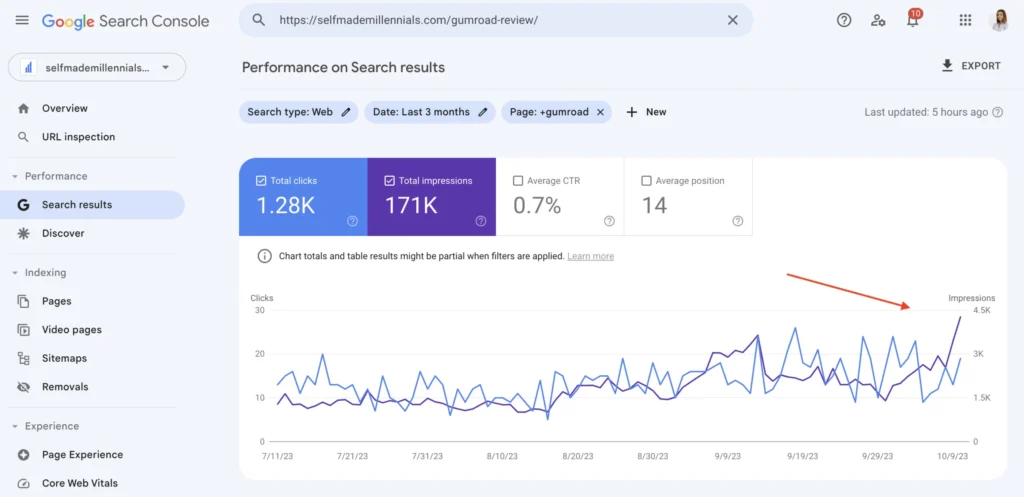
In my case, I’ve reviewed all the Semrush recommendations for my Gumroad review article and implemented some of them.
In particular, I
Updated roughly 30% of the content
Improved metadata
Improved the content structure
Added some of the recommended semantically related keywords
Semrush has also listed a few websites I could use to build backlinks. However, I did not build any since I didn’t have time for it.
Nevertheless, the impressions and traffic to the Gumroad review page increased. Therefore, I suggest updating content on your top-performing pages from time to time to maintain rankings.
How the blog post performaned after implementing Semrush on-page recommendations.
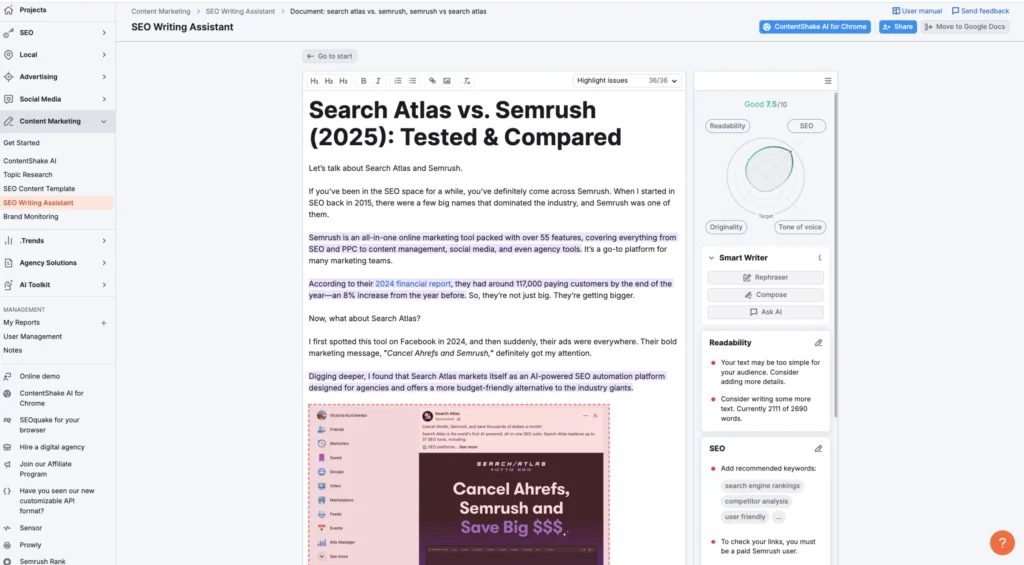
Semrush SEO Writing Assistant
There is one more tool I want to talk about in this Semrush review.
When I first tried Semrush SEO Writing Assistant, there were no tools like Koala AI, Frase.io, Writesonic, or ChatGPT to help with on-page SEO.
I connected Semrush SEO Writing Assistant to Google Docs to get instant tips on improving my content for SEO. It made things easy because, by the time I finished writing, my post was already optimized and ready to publish.
If you want to use it, just enter your target keyword in the sidebar and start writing. The tool will give you real-time feedback on:
Keyword use – It checks how often you use your keyword and if it’s in the right places.
Readability – It shows how easy your content is to read and suggests ways to improve it.
SEO score – It gives your content a score based on keyword use, readability, and SEO best practices.
Semrush SEO Writing Assistant.
To wrap up
You’ve made it to the end—nice job!
I kept this article long on purpose so I could dive deep into all of Semrush’s features and share my experience using it for all SEO professionals and website owners.
Semrush isn’t the most affordable tool, but I use the Pro plan for my own projects, client keyword research, and competitor analysis.
If you’re in SEO or run an online business, having a solid SEO platform can make a big difference by giving you reliable, up-to-date data for smarter decisions.
If interested, join the 14-day free and extended trial (normally 7 days) to understand how the platform works and whether it suits your needs. Give it a try and see whether it works for you.
FAQ
As I mentioned at the beginning of the article, I saved all the basics for the end. So, let’s go over some common questions you might have!
What is Semrush?
Semrush is one of the most popular AI-powered SEO tools on the market, and it is used by businesses of all sizes, from startups to Fortune 500 companies. It is known for its comprehensive data and its wide range of features.
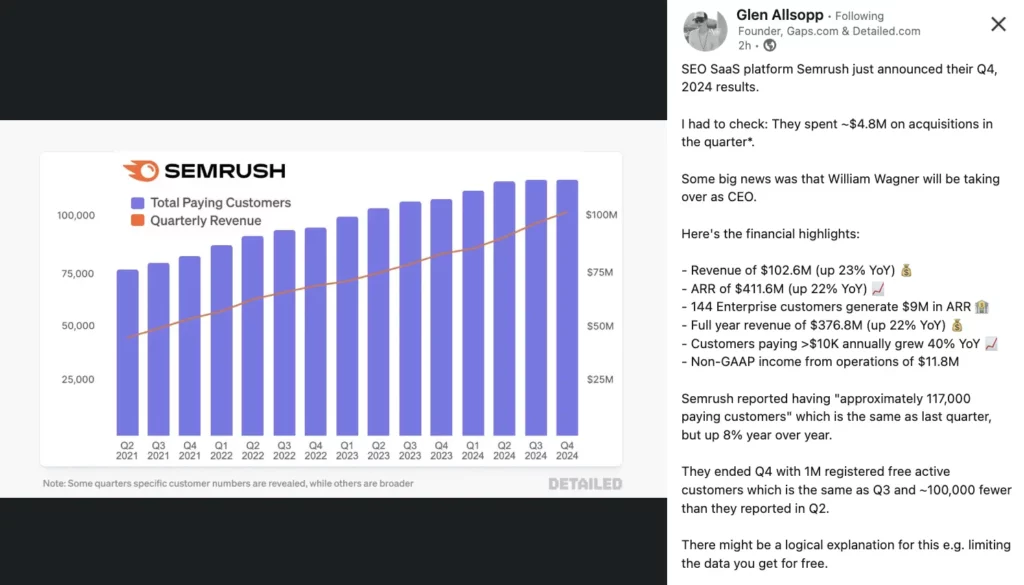
I recently came across this Linkedin post from Glen Allsopp, the founder of Detailed.com and a well-known SEO expert.
In this insightful post, Glen reviews Semrush’s performance in early 2025 and shares his predictions for its growth.
In a nutshell, Semrush is a solid company projected to expand by approximately 20% this year.
For SEOs, businesses, and content creators, this suggests that Semrush will remain a leading force in the SEO tool market.
Is Semrush data reliable?
Compared to other SEO tools, Semrush’s data is relatively reliable.
Semrush claims they obtain their data through a mix of proprietary and third-party data sources, including clickstream, web crawling of third-party websites, and the different data Semrush’s customers grant them access to, which includes our customers’ website and social media data.
According to the Semrush 2023 annual report, as of December 31, 2022, and 2021, Semrush had over 803,000 and 537,000 active free customers, respectively, and over 95,000 and 82,000 paying customers, respectively, in over 157 and 145 countries.
What are Semrush alternatives?
If you’re reading this Semrush review and thinking it might not be the right fit for you, no worries. Here are a few solid alternatives you can check out: